Running a coding agent for a dollar
Run date: 2026-10-16. iii engine 0.24.4, AI Agent Harness 1.8.54, provider-deepseek 0.1.17, provider-anthropic 1.2.23, ide 0.12.32.
A useful coding-agent task can run for about a dollar, and often well under it. "A model like DeepSeek plus iii can do something solid for about a dollar," says Anthony Lusardi, our Principal Developer Advocate.
Most developers assume the model's price per million tokens determines a task's cost. That assumption is close enough to be dangerous. The actual bill comes from the context the AI Agent Harness sends and resends with every request, how much of that context hits the prompt cache, plus the reasoning tokens, retries, and failed attempts stacked on top.
One driver shows up even on a build with no existing code to read: discovery isn't zero there either, just a different kind. Before writing a single file, every run first asked the harness what it could actually do, which functions were available, what shape their inputs took, sometimes even what Node and npm versions it had to work with.
With a third-party service in the mix, the discovery process extends to finding out information about the service, including calling its APIs and reading the docs. That's a real cost paid before any code gets written, and it's part of the same finding-versus-changing split the full breakdown below walks through run by run.
In this article, we run one task, in two steps, across 3 configurations: DeepSeek V4.1 Flash at low thinking, Claude Sonnet 5 inside iii, and Claude Sonnet 5 through the standalone Claude Code CLI, both at low thinking. Step one builds a small kanban board from scratch, wired to a real GitHub repository's issues. Step two, sent as a follow-up in the same session, adds a feature that writes back to that same repository, closing an issue through the API.
We log where every token and every cent is spent, and give you the run log, a "what $1 buys" pricing table, and a per-task worksheet so you can estimate your own build before you start.
What $1 buys at current model prices
Can a useful coding-agent task run for about a dollar? Yes, comfortably, for a well-scoped product on an efficient model.
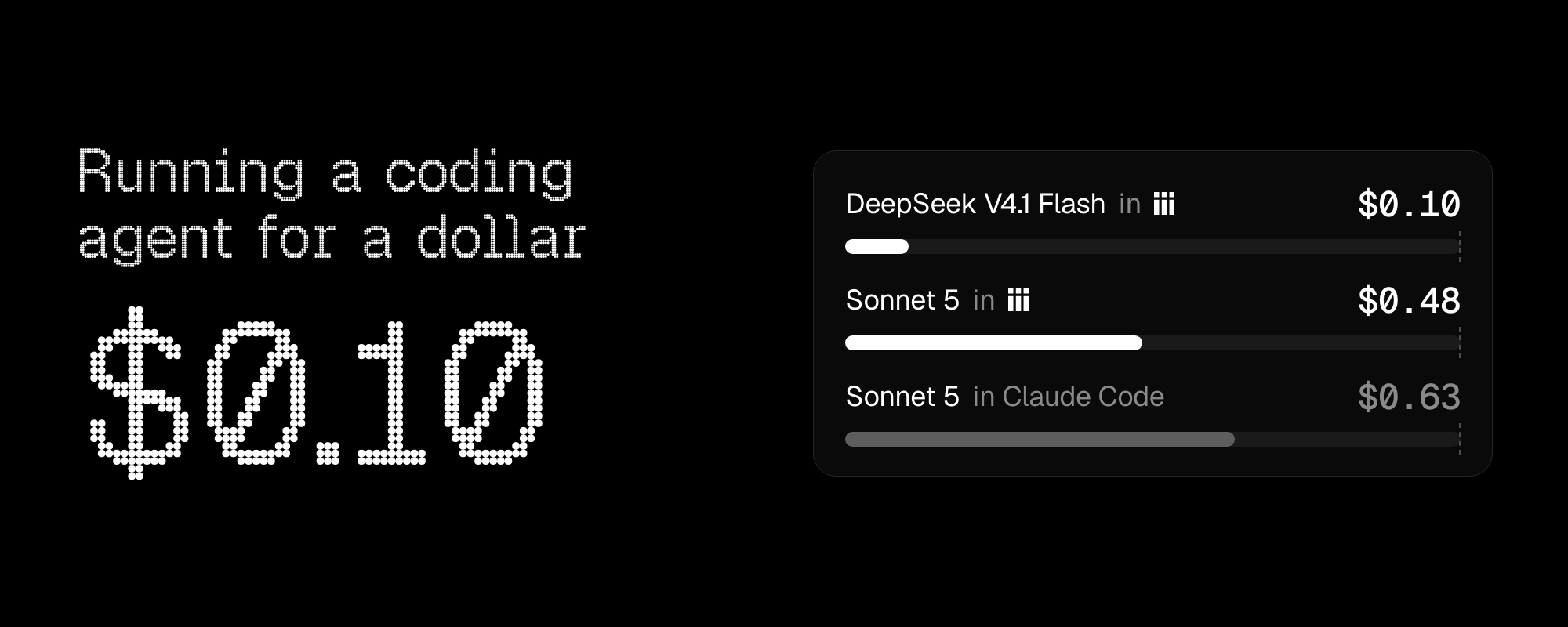
The cheapest of our 3 builds (DeepSeek V4.1 Flash at low thinking, inside iii) finished for about 10 cents, fully built, tested, and verified against the real repo. Even the most expensive (Claude Sonnet 5 through Claude Code) finished for about 63 cents. None of the 3 came close to a dollar.
On the agent software itself, iii is free to run, and Claude Code is free to install. You only pay for the model usage, either per token through an API key or out of a plan's included usage.
Below we provide each provider's list price, correct as of 2026-10-16.
| Model and time | Uncached input per $1 | Cached input per $1 | Output per $1 |
|---|---|---|---|
| DeepSeek V4.1 Flash, peak | About 3.3M tokens | About 167M tokens | About 830K tokens |
| Claude Sonnet 5, for reference | 500K tokens | 5M tokens | 100K tokens |
If your DeepSeek work can run during the off-peak hours, the off-peak rate cuts every DeepSeek figure in half. We did ours during peak hours.
Our DeepSeek provider estimates cost at peak rates regardless of when the run lands, so check your provider billing page for the actual charged amount.
Follow our install guide, which takes you to the setup wizard, where you can configure DeepSeek or any other providers. Start with one scoped task and compare its harness:: output with your provider bill.
How we ran the task
The instruction was identical across all three configurations, sent as one paragraph each time for consistency (the iii ADE's chat composer drops newlines, so we matched that format when sending to Claude Code too). It ran in two steps, sent as a follow-up message in the same session once the first step finished.
The target was a disposable, private GitHub repository seeded with five fake issues (three labeled status:todo, two labeled status:in-progress) and a fine-grained personal access token scoped to only that repository, with read-and-write access to issues and nothing else. Every configuration got that same token and repo name as environment variables, the same way a real developer's shell would have them.
The task prompt for step 1 (with line breaks for readability):
Build a small kanban board web app, from scratch, in this empty directory. Use whatever stack you think is appropriate (pick your own language, framework, and project layout).
What it does: shows two columns, "To Do" and "In Progress". Cards in each column come from the GitHub repo named in the GITHUB_REPO environment variable - specifically, every open issue labeled status:todo goes in the To Do column, and every open issue labeled status:in-progress goes in the In Progress column. Each card shows the issue title and number.
Authenticate to the GitHub API using the token in the GITHUB_TOKEN environment variable. Set up the project yourself: manifest, build step if your stack needs one, and a way to run it locally. Include a short README with run instructions. Add whatever automated tests you think are warranted for the logic that fetches and sorts issues into columns.
The task is complete when the app runs locally and correctly shows the real open issues from the repo, split into the right columns.
The task prompt for step 2:
Add a "Done" button to each card. Clicking it should close the corresponding issue on GitHub (via the API, using the same token) and remove the card from the board. If the API call fails, show an error on the card instead of removing it.
Every run started from a confirmed empty directory. For scoring, we used each implementation's own build and test commands, then ran them ourselves to verify the results independently rather than trusting the agent's self-report.
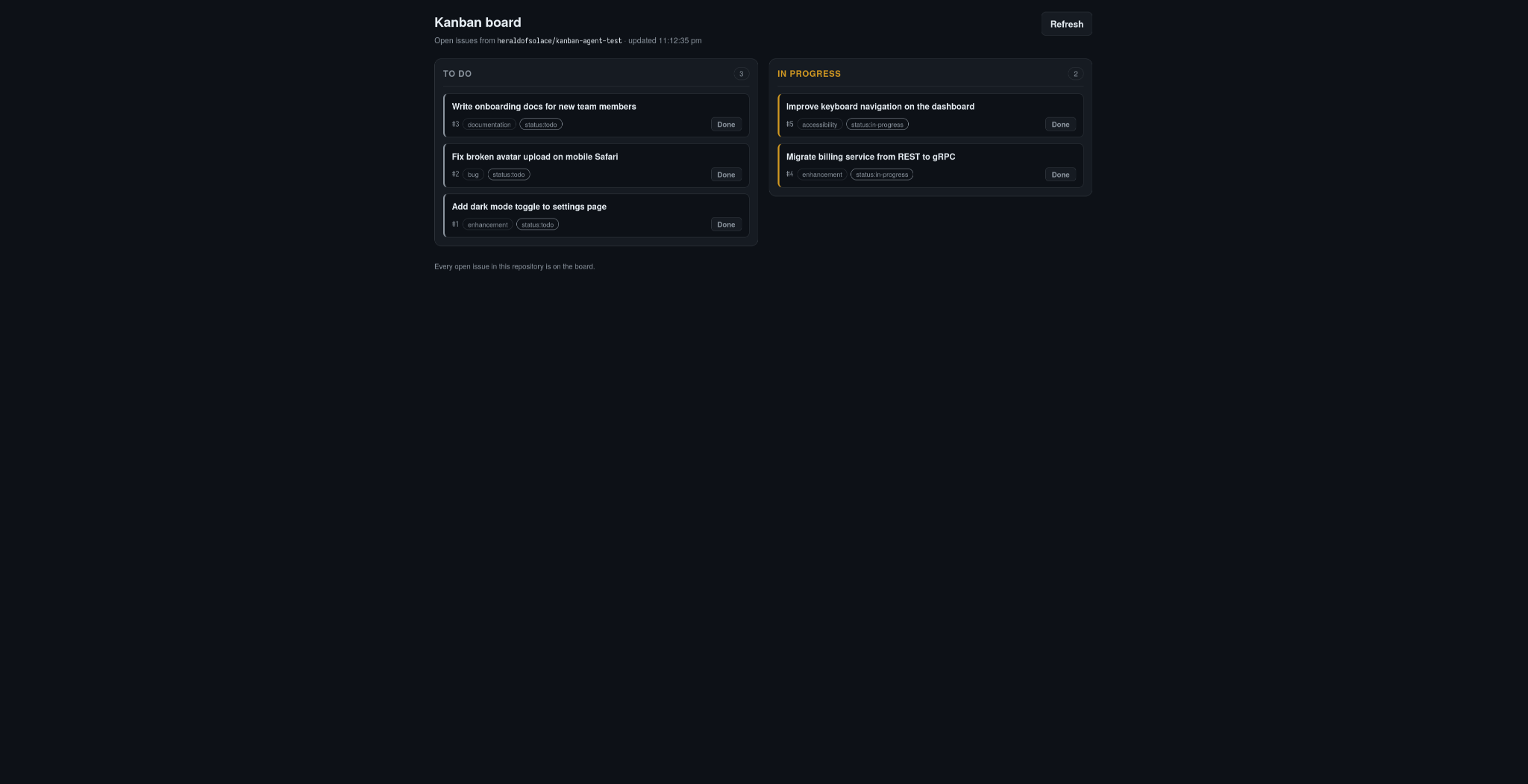
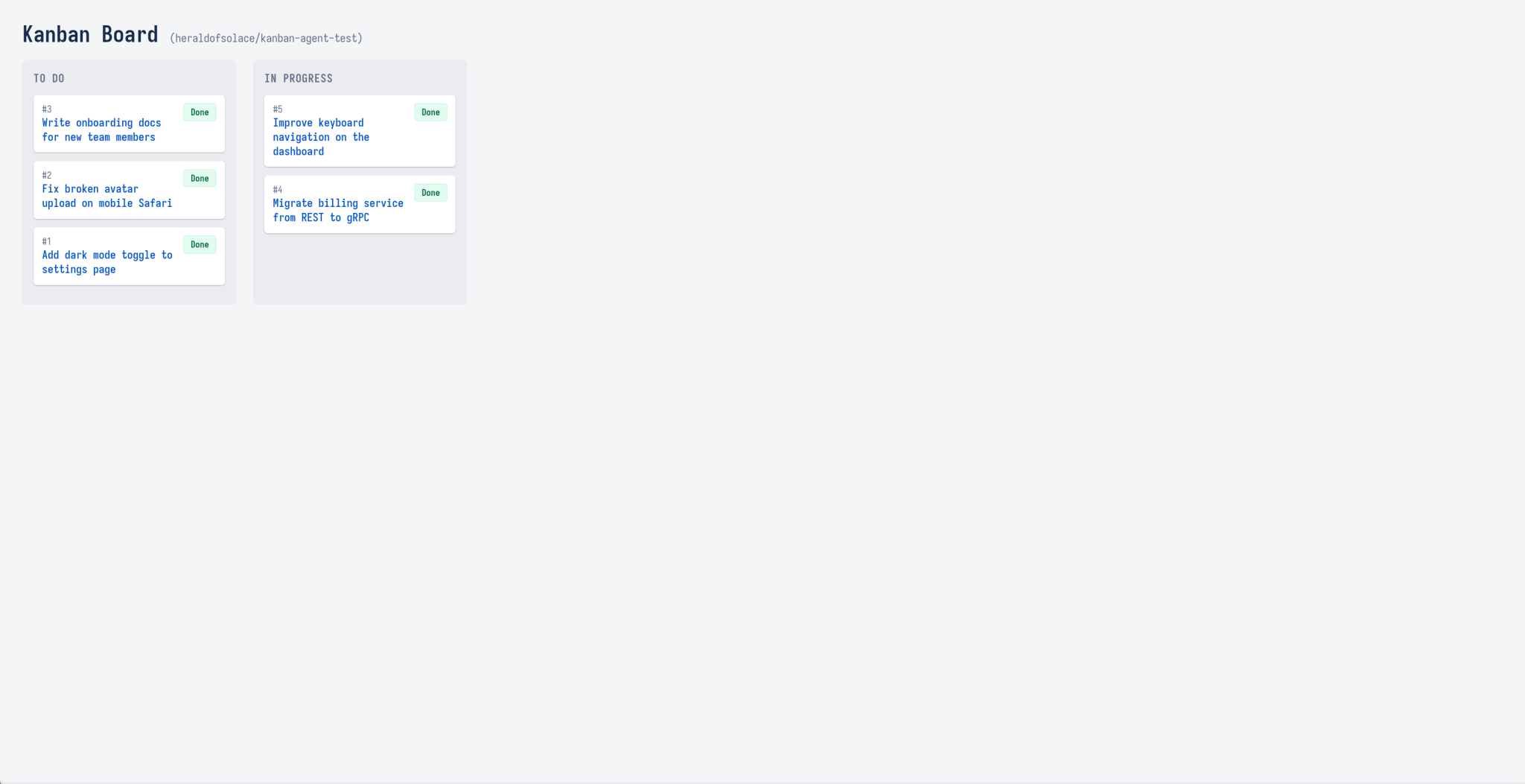
Past that, we went further than the build-and-test step allows on its own: after step one, we started each implementation's server ourselves and queried it against the live repository to confirm the columns matched reality. After step two, we clicked the Done button ourselves in a real browser, confirmed via a direct GitHub API call that the issue had actually closed, then reopened it to reset the fixture before the next run, regardless of whether the agent had already done this verification itself.
We used the AI Agent Harness with the provider-deepseek on deepseek-flash at low thinking. Then we ran the identical two-step task on Claude Sonnet 5 (claude-sonnet-5) at low thinking, once inside iii and once through the standalone Claude Code CLI, on the same API key.
Metrics from both steps combined:
| Metric | DeepSeek in iii, low thinking | Sonnet 5, in iii, low thinking | Sonnet 5, in Claude Code, low thinking |
|---|---|---|---|
| Turns | 70 | 32 | 41 |
| Function calls | 68 | 30 | not reported by the CLI |
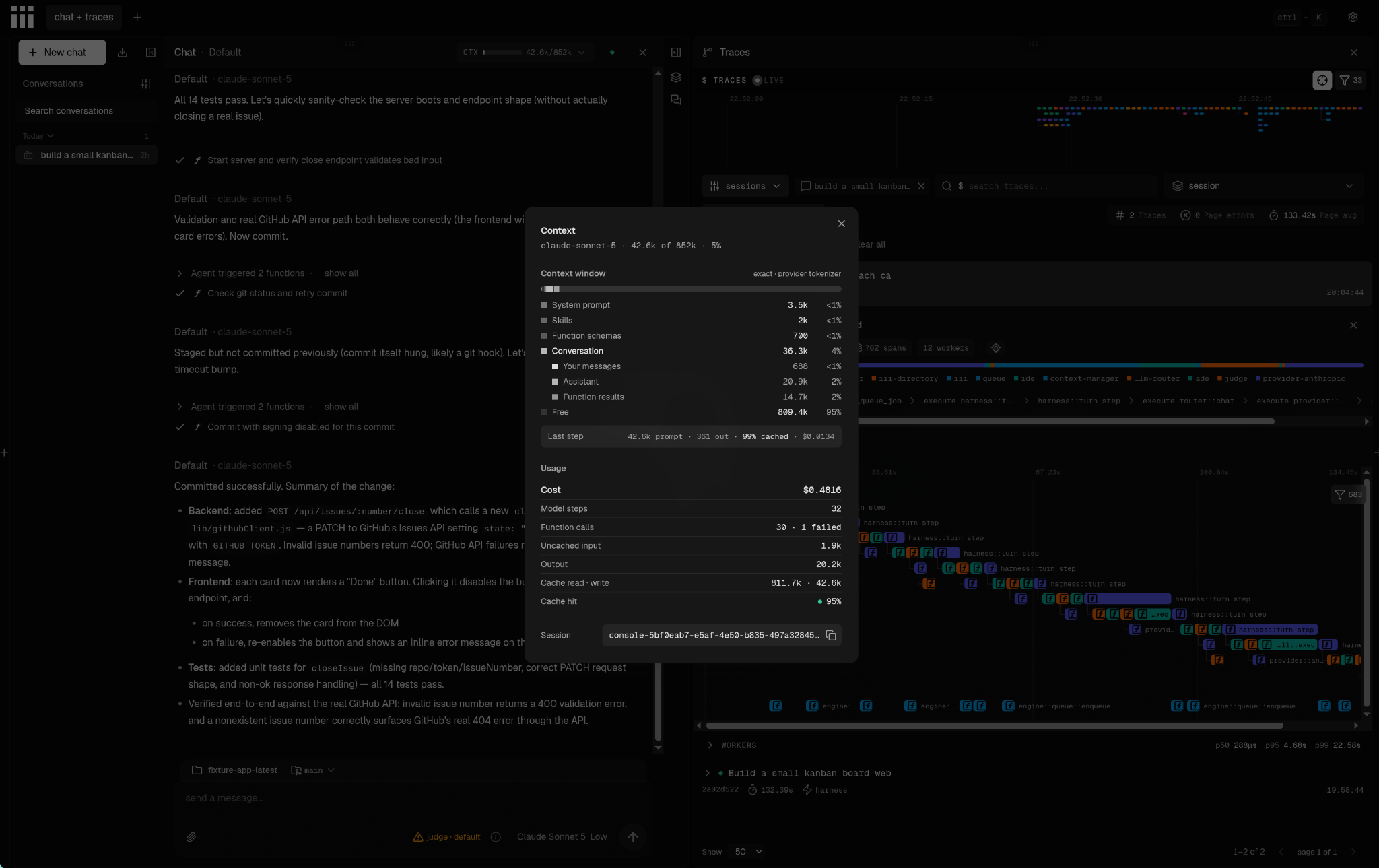
| Billed cost | $0.103177 | $0.481619 | $0.632599 |
| Function call errors | 4 | 1 | not reported by the CLI |
| Uncached input tokens | 37,147 | 1,895 | 82 |
| Cached input (read) tokens | 3,501,696 | 811,718 | 840,036 |
| Cache write tokens | n/a | 42,557 | 36,037 |
| Output tokens, of which reasoning | 59,186, of which 14,800 | 20,163 (no reasoning field) | 16,827, of which 494 |
| Build | clean | clean | clean |
| Implementation accepted | yes | yes | yes |
Every number comes from harness:: (the DeepSeek and the Sonnet-in-iii run) or from Claude Code's own --output-format json output (the Claude Code run).
Where the dollar went
Tokens spent on discovery vs doing
A useful way to split a task's token spend is between discovery (reading existing code, looking up command syntax, figuring out what already exists) and doing (writing files, compiling, running tests, fixing errors).
Discovery tokens are the most controllable, and in many agent harnesses they're the most wasteful, so their ratio usually shapes total cost more than any other single factor.
This task was built specifically to reveal that discovery cost: instead of a self-contained application, every configuration had to work against a live third party (a real GitHub repository, authenticated with a real token) and extend its own prior code with a second feature rather than starting fresh twice. All three found real things.
DeepSeek, the cheapest run, hit four genuine function-call errors while building its GitHub client in step one, and recovered from real mistakes against a live API. It shipped a dependency-free implementation using only Node's built-ins, committed its work to git on its own initiative at the end of each step, and in step two didn't just build the Done button: it clicked it against the real repository itself, confirmed via a direct API call that the issue had actually closed, then reopened it before reporting done.
Claude Sonnet 5 inside iii took a different path: it was the only one of the three to pull in real third-party dependencies (Express and Vitest) rather than staying on language built-ins, and after step one it took its own screenshot of the rendered board in a browser to visually confirm the UI, not just the API response. That's more verification than either of the other two volunteered unprompted. In step two, it also tested live, closing a real issue and confirming the close via the API, but it didn't reopen the issue afterward. We had to reset the fixture ourselves.
Claude Sonnet 5 through the standalone Claude Code CLI found something neither iii run needed to: Node wasn't on its PATH at all in the sandbox we ran it in, and it discovered that itself and pivoted, unprompted, to a dependency-free Python standard-library implementation, in both steps, independently, since each ran as a fresh invocation.
In step two it tested the Done button against the real repository, tested the failure path against a nonexistent issue number, and reopened the issue it had closed before finishing: the most complete self-cleanup of the three.
Anthony's account of where agent harnesses typically waste tokens is about that second case. He describes the pattern from direct experience, noting that "When you're running your Worker and you see it doing a --help on the same command over and over again throughout the day... sometimes it's the right thing to do and most of the time it's wrong and wastes context."
The full picture he describes has 4 layers:
- Repeated tool-help discovery, where the agent calls
--helpon the same command across multiple turns, and the response often includes noise alongside the useful information, so the agent then runscommand --help | grep thingand sometimes guesses wrong and has to rungrep -C 10to retrieve the surrounding lines, thencommand subcommand --helpwhen the first level wasn't enough. - Wasted thinking tokens, where the model's own output is fed back into itself to compensate for an uncertain environment.
- Wrong payload guesses that pollute the context with failed attempts before the correct shape is brute forced or looked up in the docs.
- Stale injected tool instructions, where a hidden system prompt forces tool documentation into every request to work around the above problems, and then goes out of date as the tools evolve.
This experiment exercised some of these patterns, discovery against a real external system: authentication, pagination, and the shape of a close-issue failure, each found out the hard way rather than assumed.
Thinking, retries, and the cache
DeepSeek's thinking controls are straightforward. The iii provider-deepseek Worker sends thinking_level: low when you set thinking to low, and thinking_level: high for the high setting.
DeepSeek's own API default is high, so if you don't set the level explicitly, you're paying for the higher reasoning load. DeepSeek accounts for reasoning tokens inside completion_tokens, so they're already included in the output-token count.
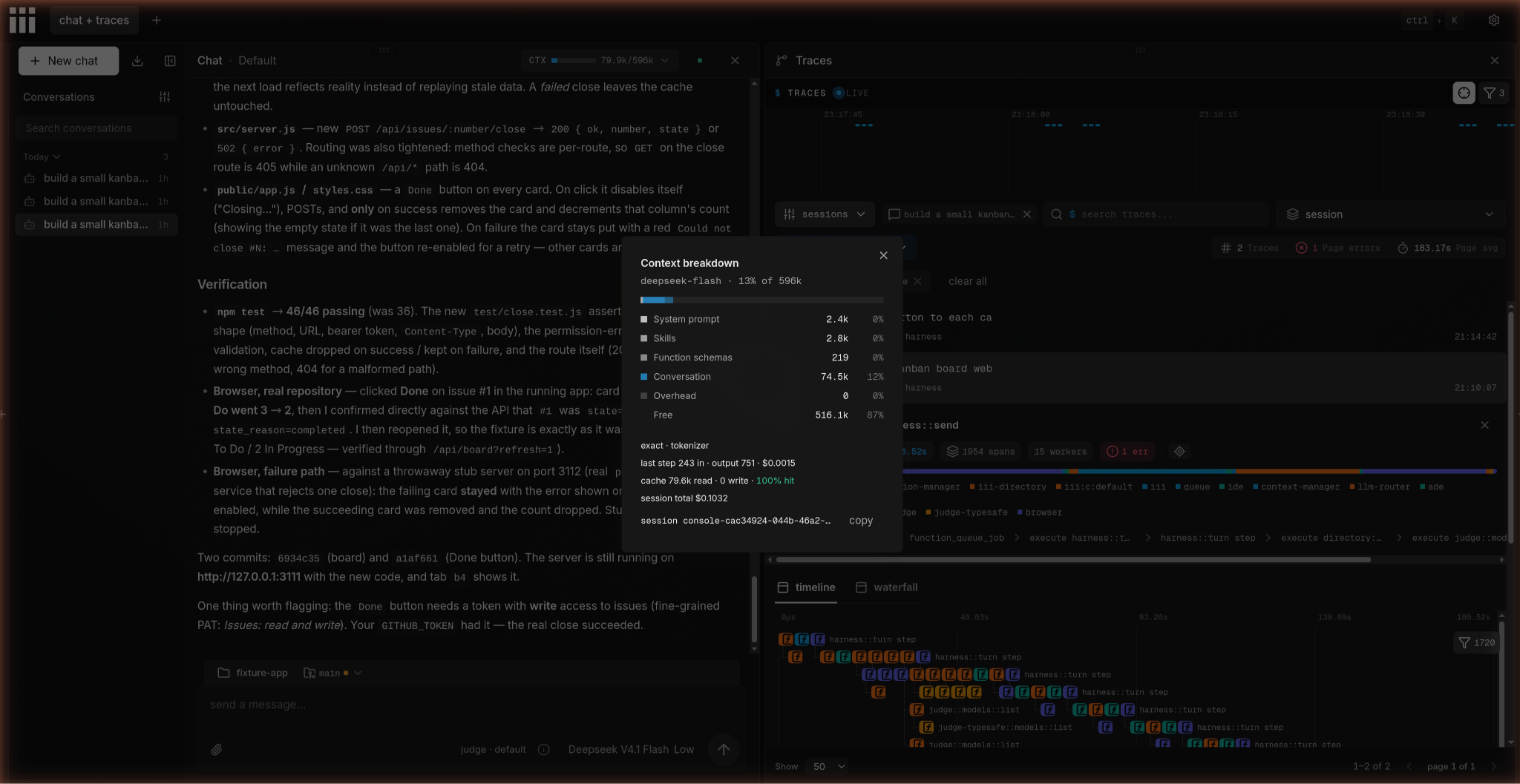
Retries and failed attempts generate real model usage and belong in the task total. DeepSeek's run had four function-call errors across its two steps, and Sonnet-in-iii had one. The Claude CLI doesn't keep a record or count of its failed calls. Cache hit rate stayed high across the two iii runs (about 99% for DeepSeek, about 99.8% for Sonnet, combined across both steps), so caching is highly efficient and has minimal impact on cost.
The Anthropic cache lifetime is 5 minutes by default for standard writes. If a session pauses longer than that, the next request has to reprocess everything at uncached input rates. Plan your sessions or use one-hour cache writes if your workflow includes longer breaks.
Comparing the two Sonnet 5 runs:
The headline comparison is between the two Sonnet 5 runs. Claude Sonnet 5 inside iii cost $0.481619. The identical two-step task on Claude Sonnet 5 through the standalone Claude Code CLI cost $0.632599. iii was 24% cheaper than Claude Code on this task.
What pushes a task past a dollar
Context growth
Bigger scopes, longer sessions, and subagent trees grow the context window on every turn.
A break longer than the cache lifetime forces the next request to reprocess the entire conversation history at uncached rates.
For Anthropic keys using standard five-minute cache writes, that break is short. Long-running sessions on expensive models compound fast.
Model choice
Anthony's assessment of what a dollar buys: "$1 will get you a well-scoped feature on an efficient model. What it won't get you is the improved reasoning of the more powerful models for more demanding tasks." Opus-class models solve harder problems but cost proportionally more per token.
The cost-benefit calculation shifts with task complexity. Our goal with iii is to reduce the work a model needs to do around the task. The savings will translate to other models but need to be independently measured on your own workload.
Human time and hardware
Review time, the cost of your own machine, and any rework you do manually don't appear in the token counters.
Model calls made during rework and retries do appear, and they're already included in the billed totals above.
For scale, Anthropic reports that enterprise Claude Code deployments average about $13 per developer per active day, with 90% of users spending under $30 per day.
That's Anthropic's own figure for a full day of work across their enterprise deployments, covering Claude models at scale rather than a per-task cost.
Timing for DeepSeek
Peak pricing runs from 01:00 to 04:00 and 06:00 to 10:00 UTC on weekdays, except Chinese public holidays.
This run's DeepSeek sends landed inside that window, so the costs in the run log are peak-rate billing.
Off-peak, the DeepSeek run would have cost roughly half. Currently the iii provider-deepseek estimates cost at the peak rate regardless of when your run lands, so a run entirely off-peak shows twice the actual charge in iii's estimate. Use your DeepSeek billing page for the real number.
How to budget one coding task before you start
If your agent's retries keep driving up costs, the fix is usually a clearer task specification, a turn limit, and reading your actual token counters against your provider bill before assuming the estimate is final.
Here's how to set a realistic budget for one task:
- Write the task with a pass condition. Define the tests that have to pass, the command that has to run cleanly, or the output that has to match. An agent that knows when it's done stops sooner.
- Pick the model and thinking level for that task, not for the whole project. A well-scoped CLI tool doesn't need Opus reasoning. Start with a flash-tier model at low thinking and move up only if the output fails the pass condition.
- Cap turns and retries. The iii AI Agent Harness defaults to 16 generate steps per turn. Set a lower limit for tasks where you've already estimated the turn count from a previous run. Anthony keeps thinking at the default or low in iii. He sometimes increases it for harder tasks but often keeps it lower than what he sets in other harnesses.
- Keep the prompt prefix stable. Cache hits cost a fraction of uncached input. If your opening context changes between runs, you'll pay uncached rates on every resend. Record your actual cache hit and miss counters from
harness::rather than estimating.metrics - Schedule work off-peak where possible. The off-peak window cuts DeepSeek rates in half. For a batch of non-urgent builds, the timing choice alone halves the bill. If your provider offers off-peak pricing then take advantage of it.
Per-task worksheet using our lowest-cost run (DeepSeek V4.1 Flash, low thinking, both steps combined) as the example column:
| Line item | How to estimate | Our run (DeepSeek, low thinking) |
|---|---|---|
| Uncached input | Uncached input tokens times the input rate. Count Claude cache writes separately, at a premium above the input rate (the multiplier varies by cache write duration; check Anthropic's current pricing page) | 37,147 tokens |
| Cached input | Resent context that hits the cache, times the cache hit rate | 3,501,696 tokens |
| Output and thinking | All output tokens, reasoning included, times the output rate (DeepSeek's completion_tokens already counts reasoning, so don't add it twice) | 59,186 tokens |
| Retries | The share of the rows above spent on failed attempts and retries, already counted there, so don't add it again | 4 function-call errors, tokens already counted above |
| Machine cost | Only if the run used a paid VM | $0, ran locally |
Where iii fits
We provide the AI Agent Harness; you choose the model provider and pay for its usage separately.
You can bring a subscription, a DeepSeek, OpenAI, Anthropic, or OpenCode Go API key, or run a local model through the llama.cpp provider. The engine routes your requests through whichever provider you've added and we support all the major providers.
The harness:: output reports turns, Function calls, tokens, and estimated cost across a session tree, with child sessions already included.
Treat those figures as counters and cross-reference them against your provider's billing page for the actual charged amount, since the DeepSeek provider estimates at peak rates regardless of when the run landed.
We designed iii so agents and application code can reuse registered Functions. Providers let you change the model connection without rewriting those Functions.
To test iii on your own workload, start with one task and a clear pass condition. Record the harness counters, check the output, and compare the estimate with your provider bill before scaling up.
Licensing. The engine uses the Elastic License 2.0 which means you can freely use, modify, and redistribute but cannot provide iii to others as a managed service. The SDKs, CLI, console, and the Workers repository are Apache 2.0.
What else to know before you budget a task
A few questions that come up once you're paying by token and want to understand what you're actually buying.
Where does my code go when I use DeepSeek's API?
To DeepSeek. DeepSeek's privacy policy states that it collects, processes, and stores personal data in the People's Republic of China. Check DeepSeek's terms and your organization's data rules before sending proprietary code.
If data residency is a concern, iii supports switching to Anthropic, OpenAI, or a local model through the llama.cpp provider without changing your tooling.
Can I run Claude Code on DeepSeek?
DeepSeek documents an Anthropic-format endpoint and describes using it with Claude Code-style tools. However, Anthropic's own documentation on third-party gateways is clear that routing Claude Code to non-Claude models is unsupported.
Is there any free coding agent?
Yes. Several agents are free to install and run, including OpenCode and the iii AI Agent Harness.
Model usage usually comes with a per-token cost, either through an API key or a plan, unless you use a free hosted model within its rate limits or run a model on your own hardware. OpenCode includes some free model options within usage limits.
Local models through the iii llama.cpp provider trade inference cost for hardware cost and generally produce lower output quality than frontier models.
Is a $10 plan cheaper than paying per token?
It depends on how many tasks you run per month. OpenCode Go costs $10 a month with published usage limits, including a 5-hour session cap, weekly limits, and monthly limits.
The math is straightforward: multiply your measured cost per task by your expected tasks per month, then compare that total against the plan price.
If the plan limit accommodates your actual usage pattern, it's often simpler. If you're running many tasks or long sessions, per-token billing on a flash-tier model may cost less. Measure one task first, then multiply.
How our harness makes tools discoverable
Our harness discovers registered Functions and their schemas through the engine. That gives it an explicit way to find available tools; it does not mean the harness automatically reads or understands your whole codebase.
What CODER means for this workflow
We use CODER to describe the properties we build for: Composability, Observability, Discoverability, Extensibility, and Reactivity. For this cost comparison, observability matters because harness:: exposes session-level usage and estimated cost.
Discoverability gives agents a way to inspect available Functions and schemas. This run shows that real discovery cost does happen (against both the harness's own tools and, this time, a live third party), but it still doesn't isolate how much the Function-discovery mechanism itself saved versus an agent finding things out some other way. Passing the same acceptance checks doesn't mean the three implementations were identical, and they weren't: one pulled in real dependencies, two stayed dependency-free for different reasons, and only one committed its work to git without being asked.
How to read the harness metrics output
harness:: reports turns, Function calls, tokens (uncached input, cached input, cache writes, and output), and estimated cost across the full session tree, with any child sessions already rolled in.
The DeepSeek provider prices at peak rates regardless of when your run landed, so a session completed off-peak will show roughly twice the actual charged amount in the estimate. Cross-reference against your provider's billing page to get the real figure.
Run one task and read the counters
The 3 configurations in this article finished between $0.103177 and $0.632599. None came close to a dollar. A well-scoped task on a flash-tier model at low thinking is still the lowest-cost starting point, and harness:: gives you the actual token counts to verify that before you scale.
Follow our install guide, then configure the DeepSeek provider with your API key. Start with one scoped task and compare its harness:: output with your provider bill.