Multi-agent orchestration: coordinating LLM agents across languages, teams, and deployments
With several agents, you need to decide who handles each task and what context they need. You also need a plan for mistakes.
What happens if one agent passes a wrong answer to the next? When agents work across teams, languages, and hosts, how do you keep that mistake from affecting another team's data?
Coordination gets harder when teams use different tools and frameworks. A Python service may need to call a TypeScript service owned by another team and deployed elsewhere.
Each team may also have different access rules. These differences often don't call for more agents, but if the work does need several agents, you need to plan how they work together.
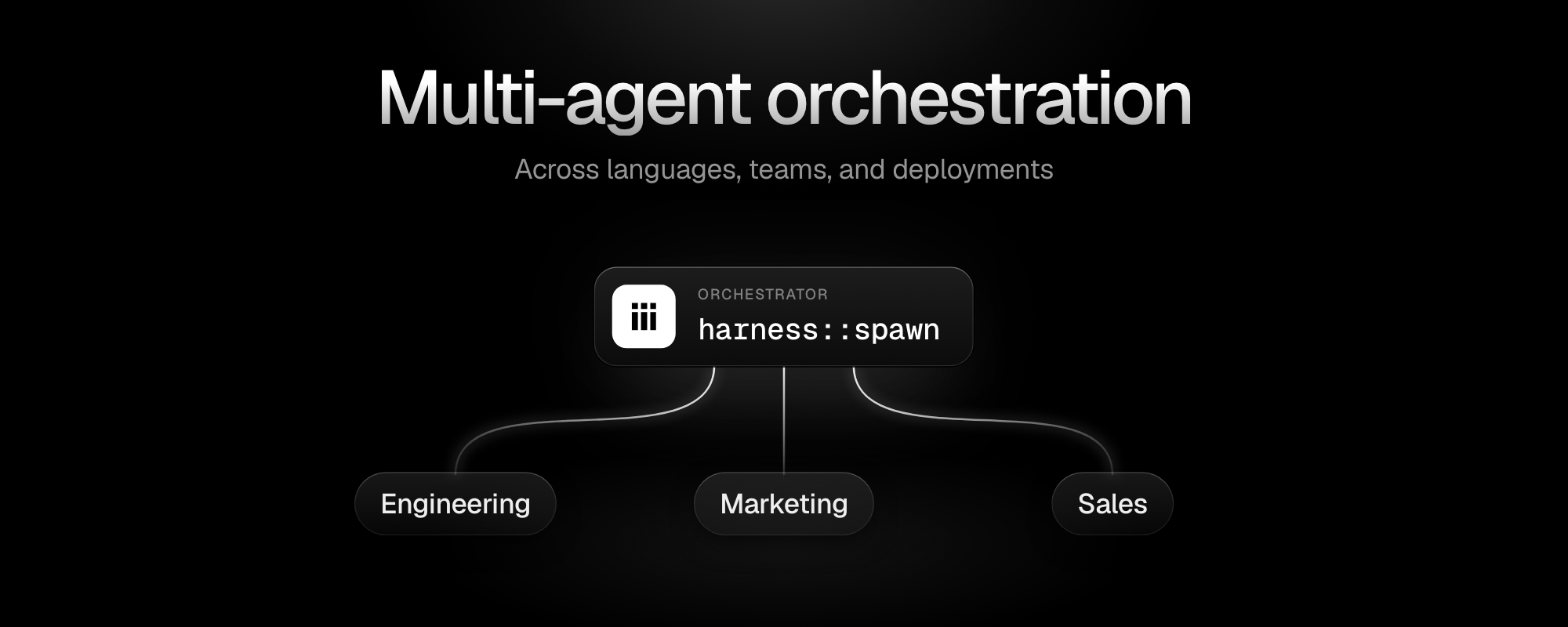
In iii, agents call tools, services, and other agents through one engine. Namespaces route those calls by team, while allow lists and rbac-proxy decide who may make them. The AI Agent Harness also runs sub-agents on the same engine.
This article covers when to use multiple agents, how the main orchestration patterns work, and one illustrative release pipeline shared by an engineering team, a marketing team, and a sales team.
Versions: the proposed design targets iii 0.25.x (0.25.0 shipped October 22, 2026, with the AI Agent Harness at 1.8.61 and
rbac-proxyat 1.0.17).
What multi-agent orchestration is
Multi-agent orchestration decides which agent does each part of a task, what context it receives, and what happens if it fails.
Here is the distinction Anthropic draws:
- Workflows follow a fixed path. A draft-then-check-then-publish pipeline is a workflow, even if a model generates the content at each step.
- Agents choose their own steps. For example, an agent might decide to reread the source notes before flagging an error.
Multi-agent systems can combine both, and the distinction affects which failure modes to anticipate.
Parallel distribution can improve output quality for certain tasks. Research published on bioRxiv in October 2026 by OpenAI and collaborators compared biological research reports from multiple GPT-Rosalind-5.5 agents with single-agent reports. Experts preferred the multi-agent reports in roughly 75% of blinded judgments on that dataset.
A survey of multi-agent system failures (arXiv, 2025) found that many multi-agent setups underperform because of system design problems rather than model limitations.
When multiple agents make sense
Adding agents isn't free, and there are several aspects to consider when creating multi-agent workflows.
Vague handoff prompts lead to duplicated or missing work. Anthropic found that this is one of the most common ways delegation breaks down: when an orchestrator hands a task to a sub-agent without a precise scope, the sub-agent fills the gap with its own assumptions. Two agents can end up doing the same piece of work, or each assuming the other is covering a piece that neither actually is.
Context coupling means each agent may have only part of the information it needs. Cognition lays this out clearly: every action a model takes depends on what it knows.
Split a tightly coupled task across agents, and each agent has only part of that context. That makes the work harder when each step needs the full picture.
For example, an accuracy check may need both the source material and a pull request. Giving each to a different agent leaves neither with the full context needed for the check. "Actions carry implicit decisions" is how Cognition phrases it. If the decision at step 2 depends on what the agent learned at step 1, those steps belong in one session.
Different teams or programming languages don't automatically need separate agents. Product may use Python and operations may use TypeScript, but the work still needs to be separable. If drafting and checking accuracy need the same context, keep them in one agent session. Language differences are not necessarily grounds for separate agents.
Multiple agents make sense in these cases:
- Independent subtasks that can run concurrently without sharing intermediate state.
- Separate context windows that let agents read different large sets of documents without each loading the other's material.
- When one agent must not see another team's data.
Add agents for independently useful work or real access boundaries, and keep tightly coupled work in one agent.
Multi-agent orchestration patterns
An orchestration system needs to decide which agent runs next, what context it receives, where state is tracked, and what happens if something fails.
Code, a model, or both can control these decisions. The table shows the main patterns, when to use them, and what can go wrong. It also notes where they fit common labels: centralized control, decentralized handoffs, and hierarchical orchestration.
| Pattern | How control moves | Fits when | What tends to break |
|---|---|---|---|
| Orchestrator with sub-agents | One agent splits the task, assigns parts, and combines results. Centralized. | Subtasks are independent and need different tools or permissions | Vague task descriptions cause duplicate or missing work |
| Handoff | The current agent passes the whole task to another agent. Decentralized. | The right specialist only becomes clear mid-task | Tasks bounce between agents without converging |
| Pipeline | Each step's output becomes the next step's input. Centralized by code. | The order is fixed, such as draft, check, publish | One bad output flows through every later step |
| Parallel fan-out | Several agents work at once, then results merge. Hierarchical fan-out. | Speed matters or several attempts improve quality | Conflicting results, and cost grows with each agent |
| Routing | A classifier sends each request to one specialist | Requests fall into clear categories | Misrouted requests fail without returning an error |
| Evaluator loop | One agent produces, another checks and sends it back | Quality criteria are clear and checkable | Loops that never converge without a retry cap |
Choose the pattern that fits the work.
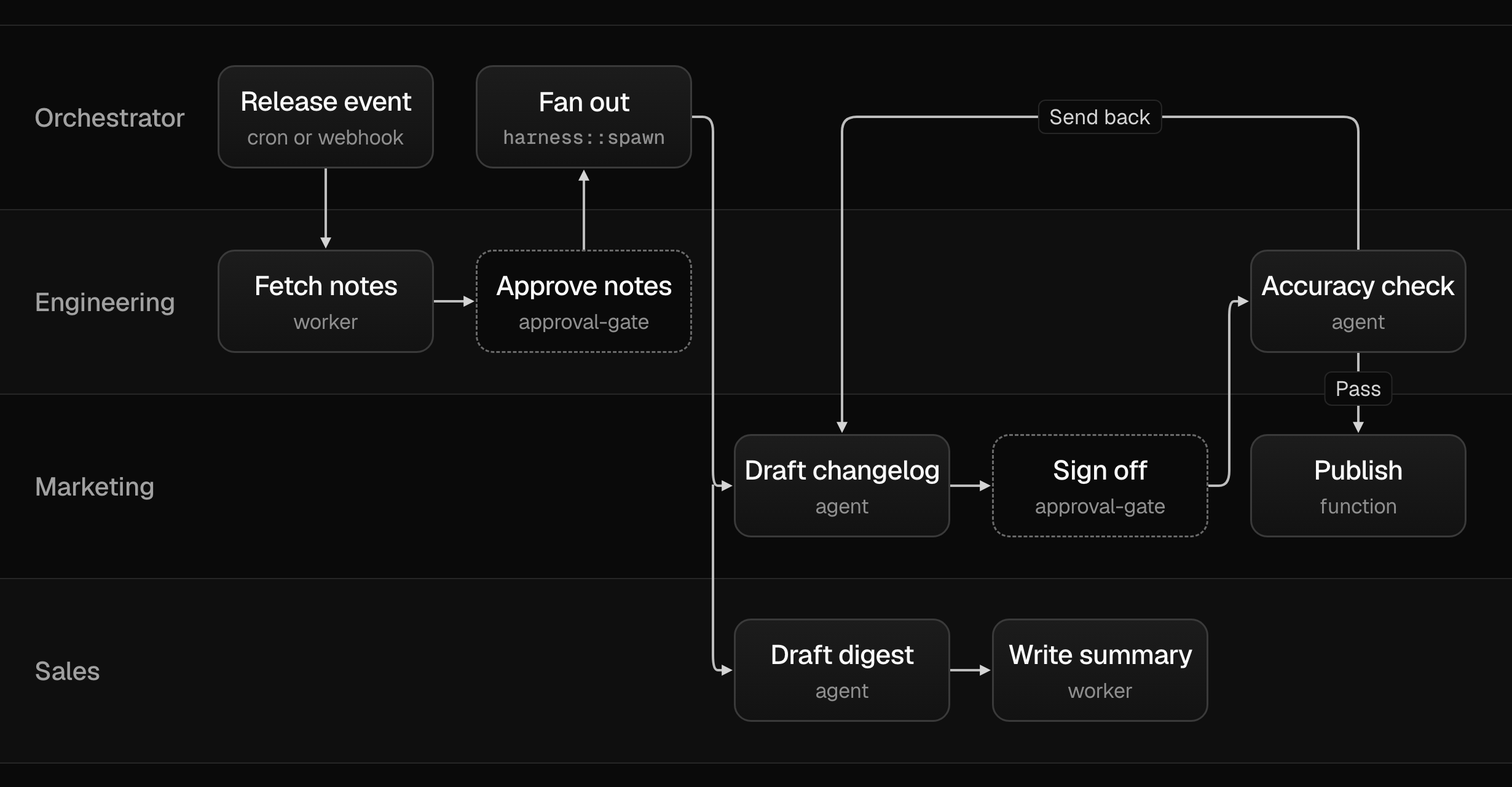
The illustrative pipeline below combines four patterns. A parent orchestrator spawns one sub-agent per team. The teams follow a pipeline: engineering approves the notes, marketing drafts the changelog, and engineering checks it. After approval, marketing drafts the changelog while sales prepares its digest in parallel. Engineering's accuracy check forms an evaluator loop, sending failed items back to marketing.
The patterns above describe how agents coordinate within a single task or session. In practice, a pipeline often crosses team boundaries too: each step may be owned by a different team, written in a different language, deployed in a different place, and bound by different permissions. The same patterns still apply, but team ownership, language, deployment location, and access boundaries become decisions of their own. Here's what that looks like in iii.
An illustrative cross-team release pipeline in iii
This proposed pipeline shows how language, deployment, team ownership, and permissions affect orchestration, how the illustrative pipeline handles the challenges, and how iii helps make it easy.
Here's the proposed pipeline: when a release is tagged, GitHub-generated release notes go to engineering for review and approval. Engineering's lead signs off on the factual notes. Marketing's agent then drafts a public changelog from the approved notes.
Marketing's lead signs off on the draft. Engineering's agent checks the changelog for accuracy against the original generated notes, using an evaluator loop with a retry cap. Once it passes, the changelog publishes. Sales then receives the approved notes separately and produces a digest of changes relevant to their team.
The flow could start from a release webhook if the engine's HTTP endpoint is reachable from GitHub, or from a cron trigger that checks GitHub's releases API on a schedule.
Illustrative pipeline steps (proposed design)
| Step | Who | Reads | Writes |
|---|---|---|---|
| Fetch generated notes | Engineering function | GitHub release | Draft notes |
| Approve notes | Engineering lead | Draft notes | Approved notes |
| Draft changelog | Marketing agent | Approved notes | Changelog draft |
| Sign off | Marketing lead | Changelog draft | Signed-off draft |
| Check accuracy | Engineering agent | Signed-off draft, generated notes | Pass or send back |
| Publish | Marketing function | Checked changelog | Public changelog |
| Sales digest | Sales agent | Approved notes | Sales summary |
The diagram below shows how the three teams' workers connect to the engine and how control flows through the pipeline.
Effects of different languages
Teams using different programming languages can drift apart as they update their clients and data contracts independently. Engineering's Python accuracy check and marketing's TypeScript publisher might agree on a data shape at the start and diverge as each team updates their code. A changelog item that passes the Python Pydantic model can still fail to parse in the TypeScript publisher if field names or types have shifted between releases. The teams need to coordinate these interfaces; the agents don't detect mismatches on their own.
In the pipeline, engineering's accuracy check uses Instructor 1.17.x with Pydantic in Python, and marketing's publisher validates incoming payloads with Zod in TypeScript. The teams maintain separate schemas, so they need to agree on the data they exchange.
In iii, workers in Node, Python, Rust, and Go connect to the same engine via WebSocket and call each other by function ID. A TypeScript worker calling a Python function may look like this:
// caller-worker/src/worker.ts (TypeScript)
const result = await iii.trigger({
  function_id: 'repo::fetch', // Python worker's function
  payload: { repo: 'my-repo' },
  dispatch: 'remote',
})
The engine routes the call to whichever worker currently provides repo::, regardless of language.
Limitation. Teams still need to agree on schemas outside iii. The engine routes calls but doesn't enforce those agreements.
Effects of connecting different teams
In iii, namespaces route function calls and keep each team's function names separate on the same engine. A worker's identity is (namespace, worker_name). Two namespaces may use the same worker_name, but within one namespace the worker_name is exclusive. A duplicate live owner is rejected with WORKER_NAMESPACE_CONFLICT. A call that names a namespace resolves only there. Without a namespace, it resolves in the calling worker's namespace.
Teams may reuse identifiers or introduce breaking changes if names and interface ownership are unclear. If engineering registers publish:: and marketing also registers publish:: with different behavior, the second registration gets rejected, and the owning team may not notice immediately. Two teams sharing an engine without a namespace boundary have implicit dependencies on each other's function identifiers.
In the example pipeline, engineering, marketing, and sales each run their workers in their own namespace. Engineering's publish:: and marketing's publish:: are separate functions that don't conflict.
A namespace configuration in worker-compose sets the namespace for all containers in that file:
# engineering-compose.yaml
namespace: engineering
containers:
  accuracy-checker:
    worker: path://./workers/accuracy-checker
    scripts:
      run: python -m accuracy_checker
Limitation. Namespaces route calls but don't restrict them. In harness 1.8.61, an agent's calls resolve in the AI Agent Harness's own namespace, so cross-team calls go through worker code that names the target namespace explicitly.
Effects of different permission boundaries
How do you stop one team's agents from reading or changing another team's data without permission? The same question applies across languages and deployment locations.
Without a plan, shared credentials or broad grants can expose one team's functions and data to other connected workers. Marketing's agent, given unrestricted access to state, could read draft notes that engineering hasn't approved yet, defeating the approval gate.
In our design, marketing and sales agents can only read approved notes through a dedicated function. They don't get access to engineering's full state scope. Function-level grants decide who can call the reader; its implementation decides which records to return.
In iii, three controls work together to manage access:
- The harness allow list: an agent profile uses
optionsto limit the functions it can call. For example, a list containing only.functions .allow engineering::,get-approved-notes state::, andget harness::allows only those functions.spawn rbac-proxy: controls access to the iii worker protocol. It provides auth, gating on functions and namespacing, middleware, and result filtering on its own port. ItsAuthResultspecifiesnamespaces,allowed_functions,forbidden_functions, andallowed_trigger_typesper connection. Theforbidden > allowedprecedence means denials take precedence. Remote workers from marketing and sales connecting throughrbac-proxy's port get grants scoped to what the proxy's auth function returns for their session.approval-gate: holds function calls for human review and manages approval decisions. Both sign-offs in this design, engineering lead approving the notes and marketing lead approving the changelog draft, are proposed asapproval-gateholds. Agents cannot call theapproval::functions. This hardcoded restriction prevents agents from approving their own held calls.*
Limitation. RBAC controls who may call what, but access control alone is not isolation. Untrusted code belongs in a sandbox. Use the rbac-proxy and harness READMEs to check the defaults for your version. For approval gate behavior and the human-in-the-loop workflow details, see OpenCode vs Claude Code vs iii and What stops your coding agent from doing something it can't undo?
How one agent coordinates the pipeline
The orchestrator starts when the release trigger fires, either from a cron check or an incoming webhook. It spawns one sub-agent per team using harness:: with that team's agent profile. Each sub-agent receives a self-contained task description specifying its inputs, expected output format, which functions it may call, and where to write its result.
Each task description needs to be specific. Anthropic's research on their multi-agent system found that vague task descriptions were a leading cause of duplicate or missing work in sub-agent setups. A prompt that tells the marketing sub-agent "summarize the release" produces something different from one that specifies "for each item in the approved-notes list, write one sentence suitable for a public changelog, referencing the pull request number where available."
In harness 1.8.61, a leaf sub-agent (one spawned without orchestrator permissions) can arm its own timer or completion wake using observe but cannot unregister observers, spawn additional agents, or send messages to other sessions. This lets a leaf signal that it has finished.
Orchestration state for each release lives in its own scope. Draft and approved content are accessed through functions with separate permissions. To wait for multiple sub-agents, use a state:: completion wake. The orchestrator registers a state observer that fires when all required results arrive, instead of polling. A timer deadline wake runs if nothing arrives by the configured cutoff.
Marketing's changelog draft and the sales digest run in parallel once engineering approves the notes, because both read the same approved notes and write to different places. There's no dependency between them, so serial execution would only add latency.
An illustrative orchestrator profile and spawn call:
# agents/release-orchestrator.md (agent profile)
model: claude-opus-5-5
reasoning_effort: high
functions:
  - harness::spawn
  - state::get
  - state::set
  - engineering::get-approved-notes
# Illustrative spawn call in orchestrator turn
iii.trigger({
"function_id": "harness::spawn",
"dispatch": "remote",
"payload": {
"profile": "marketing-changelog-agent",
"task": (
"Draft a public changelog from the approved notes at "
"state scope 'release-{version}', key 'approved-notes'. "
"Write one sentence per item referencing the PR number. "
"Write the result to key 'changelog-draft'."
),
"parent_session_id": session_id,
},
})For more on the loop engineering patterns that underpin the evaluator loop, see Loop engineering is a pattern, not a feature.
How to validate each handoff before the next agent uses it
The AI Agent Harness repairs malformed call arguments before dispatch. A changelog item that passes schema validation can still claim a feature shipped that never shipped, so the content check belongs in the function that receives the handoff.
In engineering's Python accuracy-check worker, Instructor 1.17.x with Pydantic handles the validation loop. The model produces a structured verdict for each changelog item, and Instructor retries when the output fails the Pydantic model's validation:
# accuracy_checker/worker.py (illustrative, non-runnable)
import instructor
from pydantic import BaseModel, field_validator
from typing import Literal


class ChangelogVerdict(BaseModel):
    item: str
    verdict: Literal["pass", "fail"]
    reason: str
    pr_reference: str | None

    @field_validator("pr_reference")
    @classmethod
    def must_appear_in_generated_notes(cls, v, info):
        # check that pr_reference exists in generated_notes
        # (generated_notes passed via context)
        return v


client = instructor.from_provider("anthropic")


def check_changelog_item(item: str, generated_notes: str) -> ChangelogVerdict:
    return client.chat.completions.create(
        model="claude-opus-5-5",
        messages=[{"role": "user", "content": f"Check: {item}\nSource: {generated_notes}"}],
        response_model=ChangelogVerdict,
        max_retries=3,
    )
The evidence check must link every changelog item to a pull request in GitHub's generated notes. Valid fields alone aren't enough. Items that fail are sent back to marketing's agent with the reason, and the round trips are capped. This is the evaluator loop from the patterns table.
Marketing's TypeScript publisher validates its incoming payload with Zod before writing to the public changelog:
// publisher/src/worker.ts (illustrative, non-runnable)
import { z } from 'zod'

const ChangelogPayload = z.object({
  version: z.string(),
  items: z.array(
    z.object({
      text: z.string(),
      pr_reference: z.string().optional(),
    }),
  ),
})

iii.registerFunction('marketing::publish', async (payload: unknown) => {
  const parsed = ChangelogPayload.parse(payload)
  // write to public changelog
  return { published: true, version: parsed.version }
})
Where the pipeline can fail
Worker dropout happens when a worker disconnects mid-task, and no result arrives by the orchestrator's deadline. The harness queues each step of the model's think-act cycle. This lets a worker resume an interrupted turn after a restart. If no result arrives by the deadline, a wake prompts the orchestrator to inspect the unfinished step and decide whether to retry or escalate. Check for side effects before retrying. If the worker already wrote part of the result to state, a retry may write it twice.
Queue-backed function failures behave differently from direct function failures. If a subscribed function throws or nacks, its queued call retries with backoff for up to 3 attempts by default. After that, the message moves to the dead-letter queue. That retry behavior applies to queue-delivered calls, not to direct function calls from worker code. Diagnose the underlying error, fix it, and redrive the dead-lettered message. Idempotency on the receiving function avoids double-processing on a redrive.
Inaccurate changelog items are caught by engineering's accuracy-check evaluator loop. Marketing's agent revises the flagged items and resubmits. Without a retry cap, a model that consistently misreads the approval criteria loops indefinitely. The MAST study's taxonomy of multi-agent failures categorizes this as a task verification failure, where neither agent nor human confirms the output meets the requirement before passing it forward. Once the retry cap is reached, the failed check can be escalated instead of repeating indefinitely.
Duplicate release events can produce two changelogs for the same version if the cron trigger or webhook fires twice. An idempotent publish function keyed by release version prevents the second run from writing a duplicate. This falls under system design failure in the MAST taxonomy, and it's easier to prevent at design time than to detect after the fact.
Pipeline failures and proposed handling
| Failure | What happens | What handles it in this design |
|---|---|---|
| A worker drops mid-run | A result may not arrive before the configured deadline | A deadline wake prompts the orchestrator to inspect the incomplete step and choose a retry or escalation. Check side effects before retrying. |
| A queued GitHub step fails | If the subscribed function throws or nacks, its queued delivery retries with backoff for up to 3 attempts by default, then dead-letters. Direct GitHub calls don't get automatic retries. | Diagnose and fix the underlying error, then redrive the dead-lettered message. Make the operation safe to retry. |
| Inaccurate draft | Engineering's accuracy check rejects the item | Marketing's agent revises it, with a cap on round trips |
| Duplicate release event | Two changelogs could publish | An idempotent publish function keyed by release version |
Plan deadlines, idempotent publishing, and capped retries before the first agent runs. They're design requirements, not something you add after the first production incident.
Where iii fits
The proposed design uses one engine routing calls by namespace, the AI Agent Harness for sub-agents and agent profiles, allow lists and rbac-proxy for access control, and approval-gate for the two human sign-offs. All three teams' workers connect to the engine the same way, regardless of language.
The language boundary is transparent to the engine: workers call each other by function ID, whatever language they use. You can move a worker by redeploying it without rewriting its callers. The quickstart includes a TypeScript worker calling a Python worker. Use it to test cross-language calls in your environment.
This brings routing, access control, and agent coordination into the same system. Whether that means fewer components for your team depends on what you already run.
Follow the iii install guide to start the AI Agent Harness and console on your machine.
What else to know before you split work across agents
The questions below come up regularly once a team moves from one agent to several.
How many agents should work on one task?
Start with one agent. Add another for work that can run independently or needs separate context, tools, or permissions. Keep tightly coupled work together rather than choosing an agent count upfront. In harness 1.8.61, the default sub-agent depth limit is 3, with up to 8 spawns per turn. Both limits are configurable. Anthropic's multi-agent research found that the right agent count follows from the task structure, not from a target number set in advance.
Do I need a framework for multi-agent orchestration?
Direct model API calls can handle simple coordination. Consider a framework if its routing, shared state, access rules, and failure handling fit your application. LangGraph, CrewAI, and Microsoft Agent Framework package the patterns from the table above in different ways. Choose based on the patterns you need and how each framework implements them. Having several agents doesn't by itself require a framework.
Do agents need A2A or MCP to work together?
Inside one system, no. A2A and Model Context Protocol connect agents and tools across vendors and processes, which is the right use case for them. Inside iii, agents reach tools and other agents through the engine by function ID. The mcp worker exposes iii functions to MCP clients for existing applications that expect an MCP interface.
Can existing coding agents join a multi-agent setup?
Yes. The iii workers registry includes pi, opencode, codex, and claude-code workers that expose each agent as a function, such as pi::. Check each worker's README for the agent versions it supports before building against it. Versions change, and a worker pinned to an older agent version may behave differently than the current release of that agent.
Should each agent use a different model?
Choose a model for each agent's task. You don't need a different model for every agent. Engineering's accuracy check warrants a model with strong reasoning. The function that fetches notes from GitHub's API needs no model at all. Test quality, latency, and cost on the actual workflow before mixing models. In iii, an agent profile sets the model and reasoning effort for its sessions, so each team can configure their own without affecting the others.