Observability in iii isn’t something you bolt onto each service. Every cross-worker call already flows through the engine, so the engine can trace and log the whole system end to end. In this chapter you open the console to see that, then, if you want, read the same data directly from the engine.

Open the console

The engine has been running since Chapter 1. Start the console, a browser UI for inspecting it:
iii console
Open it at http://127.0.0.1:3113. Every worker you added is listed with the functions and triggers it registered. Navigate to the traces tab and run the below command to watch the invocations stream live:
curl -s -X POST http://127.0.0.1:3111/links \
  -H 'Content-Type: application/json' -d '{"url":"https://iii.dev","code":"iii"}'
for n in $(seq 1 5); do curl -s -o /dev/null http://127.0.0.1:3111/s/iii; done
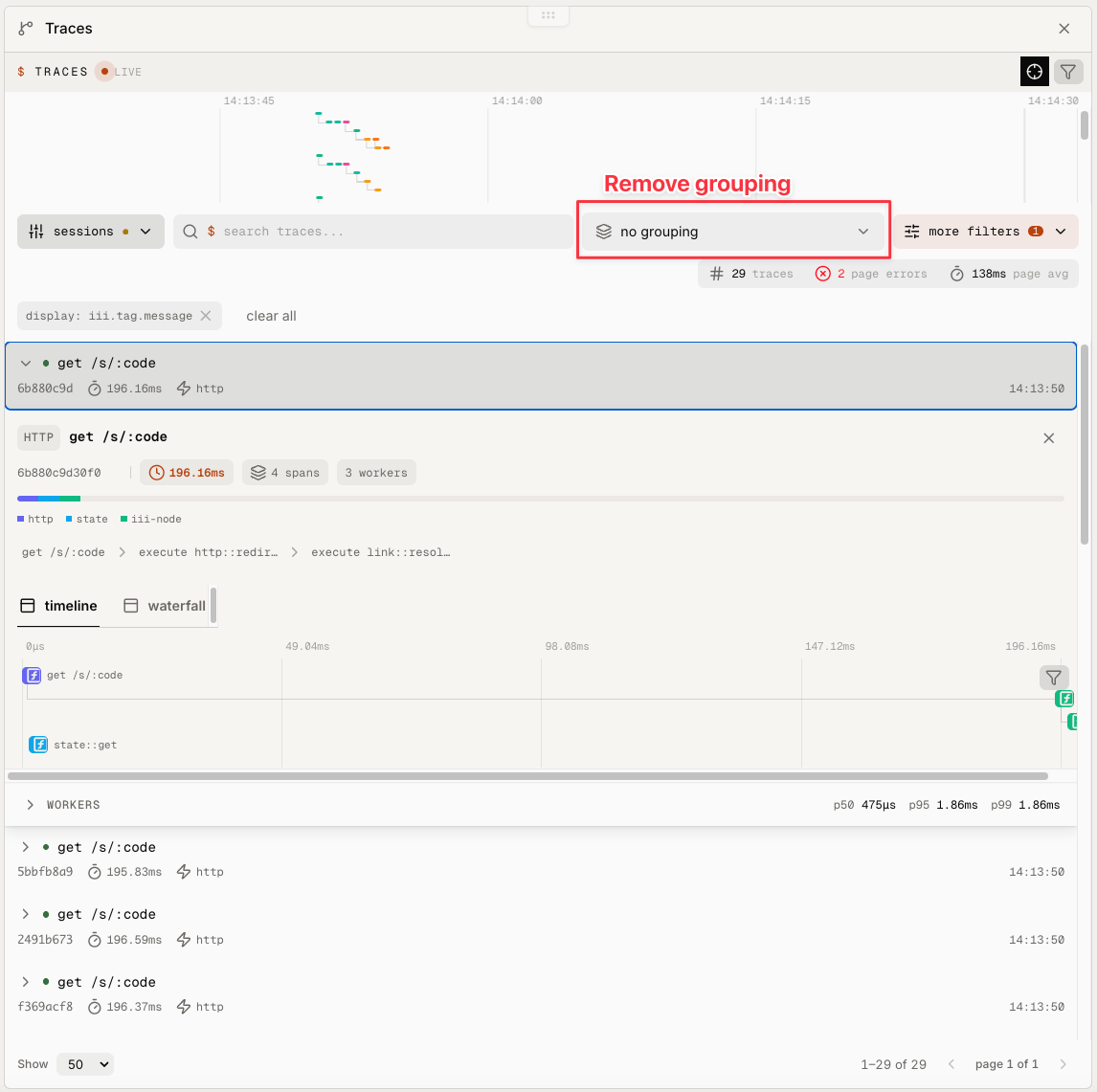
Click any redirect to see a full waterfall of timed spans crossing from iii-http into link and back: iii console Traces page showing redirect spans sorted by duration with the waterfall for a selected GET /s/:code trace You didn’t add a tracing library or thread a request ID between services to get this. iii project init added the iii-observability worker to config.yaml, and from then on every request gets a trace and every Logger line is collected automatically, across workers. In iii end-to-end observability is an inherent property of the system.
iii-observability emits OpenTelemetry. Its traces, metrics, and logs are emitted as OTel, so you aren’t locked into the console. Point the worker at Honeycomb, Grafana, Datadog, or any other OTel-compatible backend and your iii traces flow straight in. See the worker’s configuration on workers.iii.dev/workers/iii-observability.
For most teams the console (or your own OTel backend) is all you need day to day.
The rest of this chapter is an optional deep dive on how to read the same logs and traces directly from the engine. You can jump to Ch. 3: Persist everything if you prefer.

Read the logs

Create some traffic:
curl -s -X POST http://127.0.0.1:3111/links \
  -H 'Content-Type: application/json' -d '{"url":"https://iii.dev","code":"iii"}'
for n in $(seq 1 5); do curl -s -o /dev/null http://127.0.0.1:3111/s/iii; done
curl -s -o /dev/null http://127.0.0.1:3111/s/missing
Then check the logs:
iii trigger engine::logs::list limit=100 \
  | jq '.logs[]
      | select(.body == "link resolved")
      | { body,
          data: (.attributes | with_entries(select(.key | IN("trace_id","span_id","service.name") | not))),
          trace_id,
          service_name }'
The jq pipe filters the response down to the link resolved entries and keeps the parts that matter for this tutorial, try removing it to see all the information the iii engine can provide.
{
  "body": "link resolved",
  "data": {
    "log.data": {
      "code": "iii",
      "found": true
    }
  },
  "trace_id": "797d427e4d0c3491cfc45f0d40c4e1b1",
  "service_name": "iii-node"
}
data is exactly what you passed to logger.info; the engine stores those fields as individual log attributes, so the jq above gathers everything except the OTel metadata keys. The trace_id ties the log to the trace it came from, which is where you look next.

Follow a redirect across workers

Every request is also a trace. Grab the most recent redirect’s trace_id and walk the whole request as a tree. Capturing the id into a shell variable keeps this a single paste:
trace_id=$(iii trigger engine::traces::list name="GET /s/:code" limit=1 | jq -r '.spans[0].trace_id')
iii trigger engine::traces::tree trace_id="$trace_id" | jq -r '
  def walk(depth):
    ("  " * depth // "") + .name + " (" + .service_name + ") "
      + (((.end_time_unix_nano - .start_time_unix_nano) / 1e6 * 1000 | round) / 1000 | tostring) + " ms",
    (.children[]? | walk(depth + 1));
  .roots[] | walk(0)
'
The jq pipe walks the nested roots tree, indenting each span by depth and printing its service_name and duration in milliseconds. You get the full path of one redirect, across two workers:
GET /s/:code (iii) 2.044 ms
  execute http::redirect (iii-node) 1.444 ms
    execute link::resolve (iii-node) 0.52 ms
This shows the redirect arriving through /s/:code via the iii-http worker’s Trigger, calling http::redirect in link, which then calls link::resolve in the link worker via the engine. The per-span timing shows where the request spends its time.
Worker spans export on a short delay, so a brand-new request’s trace can look truncated for a second or two. Give it a moment, or read a slightly older trace.
To compare many requests, list the redirect spans sorted by duration, slowest first:
iii trigger engine::traces::list name="GET /s/:code" sort_by=duration_ms sort_order=desc limit=10 \
  | jq -r '.spans[]
      | "\(((.end_time_unix_nano - .start_time_unix_nano) / 1e6 * 1000 | round) / 1000) ms  \(.trace_id)"'
Each line pairs a duration with its trace_id, slowest first:
2.044 ms  6b20e1fe001742c25bb7dc570b57fe42
1.700 ms  797d427e4d0c3491cfc45f0d40c4e1b1
The slowest redirects rise to the top; open any one’s trace_id with engine::traces::tree to see which hop is responsible.

Conclusion

Linkly is now observable: the console shows every worker, trace, and log as it happens, and you can read the same data from the engine with iii trigger. The links are still kept only in memory, though, so restarting the engine clears them. Next, in Ch. 3: Persist everything, you move them into durable storage.