browser
v0.3.2A browser on the iii bus - shared Chromium with persistent, restorable tabs and incognito tabs. Navigate, act, read the page console, pick elements. Also parses HTML natively without a browser (browser::* - css/xpath/regex, element search, markdown).
Install
iii trigger compose::add worker=browser@0.3.2Run in your project with the iii engine running. Exact versions are immutable and digest-pinned.
browser
A browser on the iii engine bus: one shared
Chromium with tabs, a persistent profile (cookies, logins, storage) under
data/browser, tabs that survive restarts, and incognito tabs that save
nothing. Agents open a tab (a session), read the page as an
accessibility-tree outline, click and type against element refs, and read the
page's own console and network history back as data. The single most
important thing it gives you: "why is my dev server page blank?" becomes
answerable, because the page's console errors are one
browser::console::read away. The ADE
worker adds the human window: a Chrome-style tab strip over a streaming
viewport (Chromium-pushed screencast frames), an address bar, developer tools
behind the menu, and click-to-pick elements into chat.
It also carries a native Rust scraping surface, browser::*: HTTP
and browser fetching, screenshots, persistent sessions and BFS crawling, plus
CSS/XPath/regex queries, element search and HTML→Markdown that run over any
HTML string with no browser at all. See
Scraping and HTML parsing below.
In the console
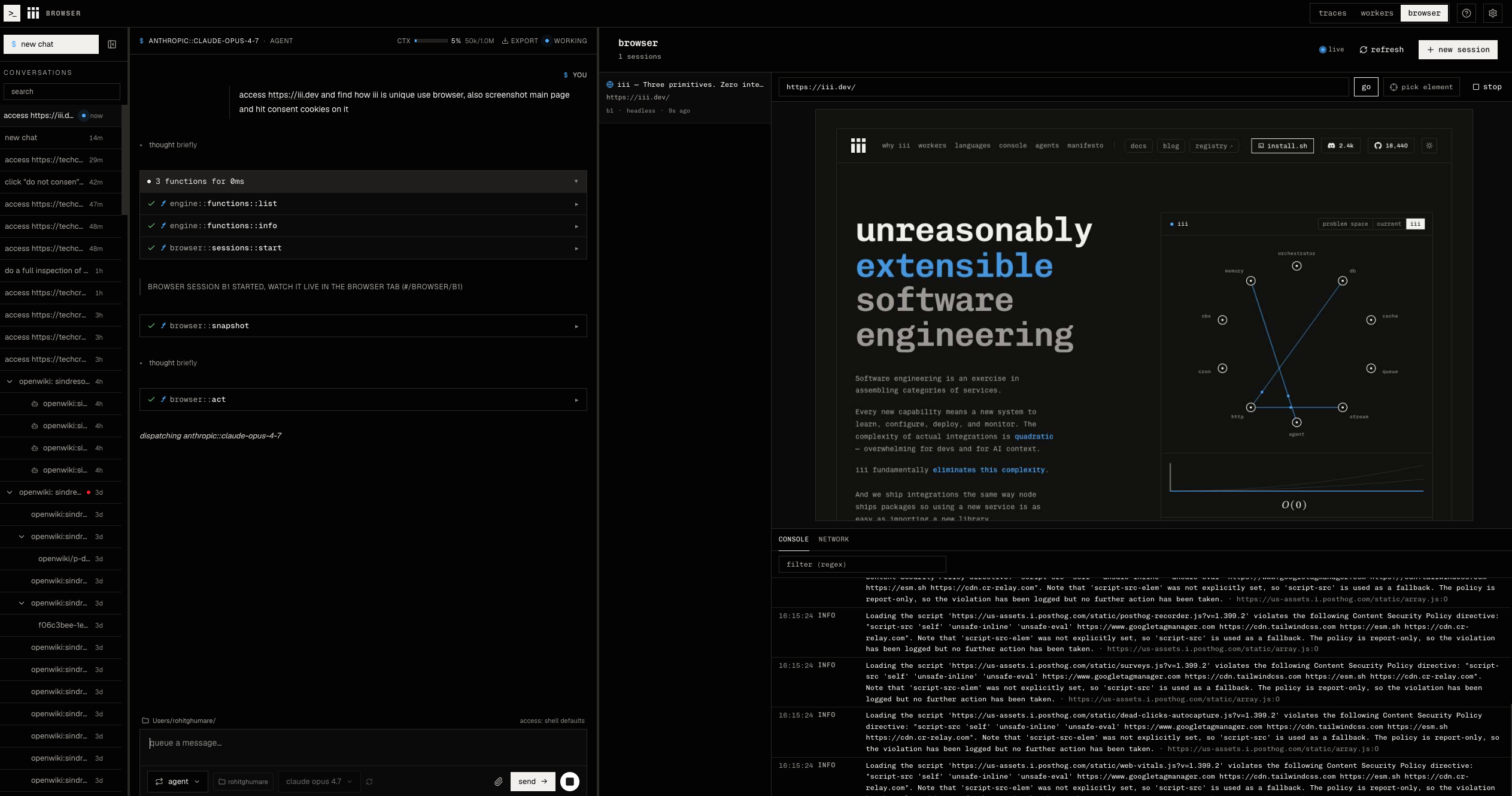
An agent reads a page as an accessibility outline (browser::snapshot) while
you watch the live viewport and console feed:
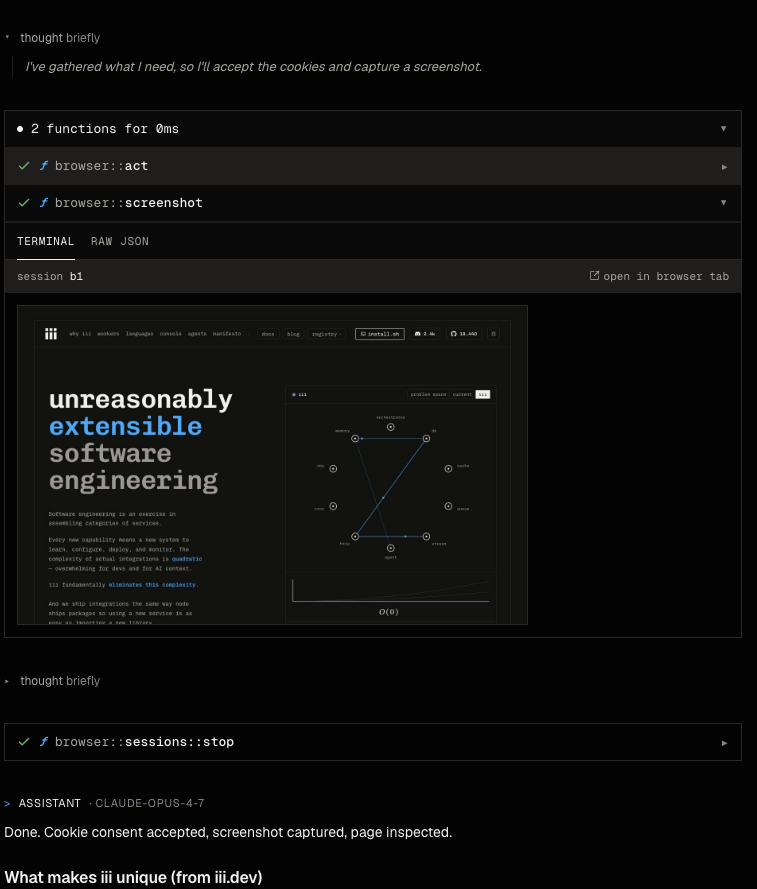
browser::screenshot renders the captured image inline in the chat card:
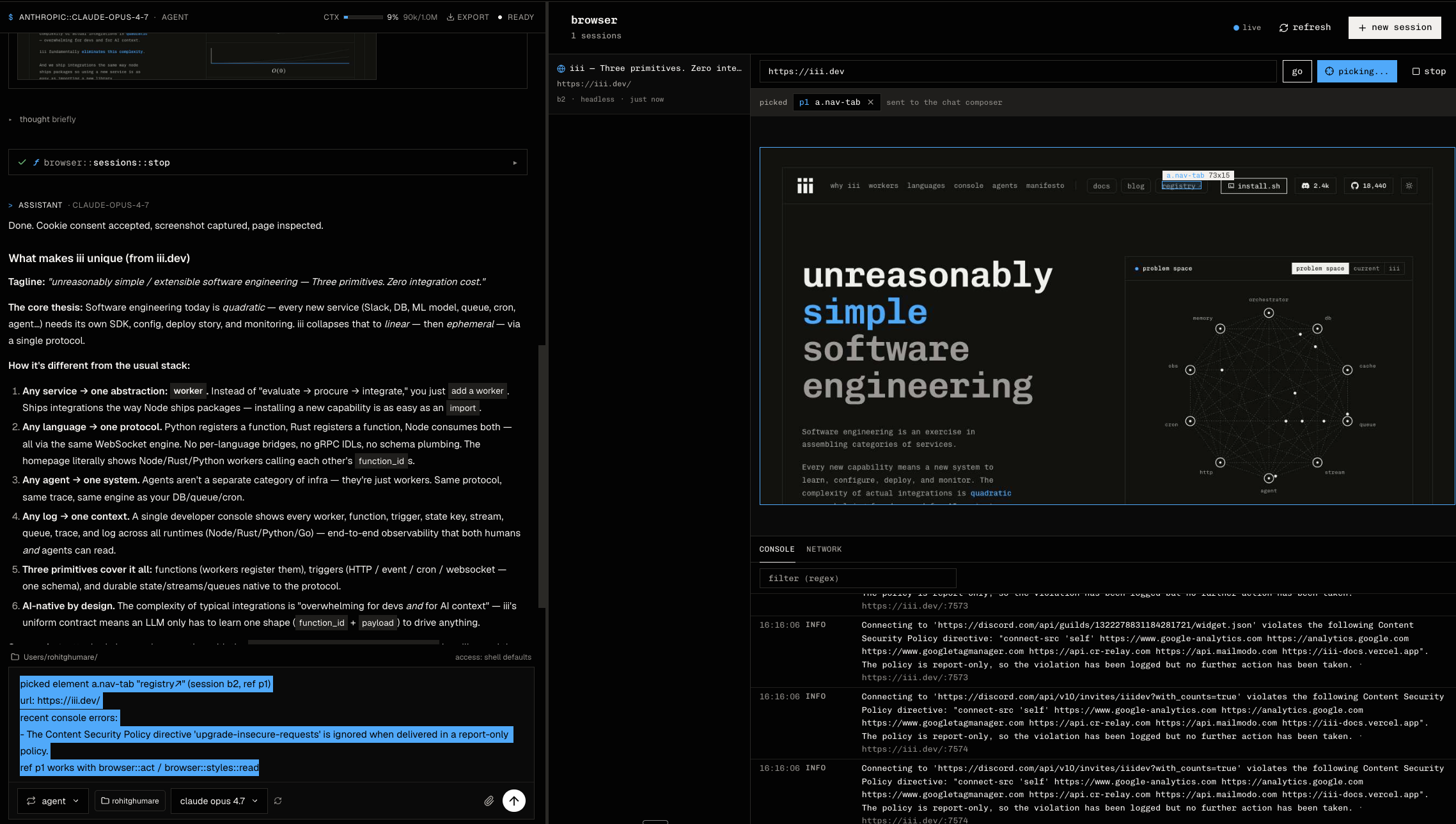
Pick mode highlights the element under the cursor and drops it into the chat composer as an actionable ref:
In the iii app
The worker also publishes a native app, browser::native-ui: a bundle
built from native-ui/ by build.rs (next to the console UI),
embedded in the binary and served by its hash. The iii IDE app shows it as
the Browser app, on a phone, a tablet or the desktop: the tab list
(incognito tabs under their own header), the live page with touch (a tap
clicks, a drag scrolls, a long press is the page's menu) and the page's
keyboard, the address bar with back, forward and find, and console and
network cards that follow the page live. How a worker ships such an app is
in docs/sops/native-ui.md.
The app drives the same tabs as the console, through what the worker gives a native viewer (details in Live view for native viewers):
- a named viewer with a lease (
viewer_id,lease_ms), renewed while the page is on screen, so a phone that goes away stops holding the tab; scale, the screen's density, so frames are sharp up toframe_density(default 2; the app asks for 1 on a metered network);browser::resizewithmobile: trueandfit: trueat the size of its view: the page sees a phone (touch, an Android user agent) and fills it;browser::actfor a person's own taps and drags (the worker draws nothing into the page;ghost_cursoris accepted and ignored).
Tabs, sleep, and incognito
A session is a tab in the worker's browser. Tabs share one Chromium process
and one profile, so a login in one tab is a login in all of them, exactly as
in a browser. Regular tabs are saved to <data_dir>/tabs.json (url, title,
visited pages, back/forward stack) and come back after a worker restart.
- Lifetime. A tab stays open until
browser::sessions::stop, or until the optionalttl_msit was opened with elapses. The console opens tabs with no lifetime. - Sleep. A tab nobody watches (no console viewer, no recording) or calls
for
inactive_after_ms(30 minutes by default) goes to sleep: its page is closed, the tab is kept and still listed (active: false). Any call on it, or selecting it in the console, opens the page again at the url it remembered; back/forward keep working from the tab's own stack. When the last live tab sleeps, Chromium quits and its profile is flushed to disk; the next tab launches it again.max_sessionscaps live tabs: opening one more puts the least recently used unwatched tab to sleep first. - Incognito.
browser::sessions::startwithincognito: trueopens a PRIVATE tab in its own throwaway browser context: no shared cookies or logins, nothing written underdata_dir, no history kept, not restored after a restart, and inactivity closes it for good instead of putting it to sleep. The console shows it in Chrome's dark private-window palette. - Clearing data.
browser::clear-dataclears the site a tab is on (its cookies, its storage, the shared cache) — the ⋮ menu's "Clear cookies and site data".browser::clear-browser-data(Settings → Clear browser data) closes every page, quits Chromium, and deletes the whole profile and downloads; tabs stay and reopen signed out. - Loading like a browser. A page that fails to load (a network error, an
empty HTTP error response such as x.com's 400 to unknown clients) leaves
Chromium's error page in the tab and is reported in
navigate'sok/error, not thrown. Anhttps://url on localhost,*.localhost, or a loopback/private address whose TLS handshake fails (a plain dev server) is retried overhttp://, like an address bar does; public hosts never downgrade. Pages see a plain Chrome user agent, neverHeadlessChrome. - Live view. Every tab renders in its own headless window (a window shows only its active tab, so tabs sharing one would freeze), and the console gets frames at up to 30 fps, latest frame first, whatever the bus latency. Native viewers (the iii app) hold the view through a lease and can ask for sharper frames and a real phone page; see Live view for native viewers.
Install
iii call compose::add worker=browseriii call compose::add resolves the worker and its dependencies, writes
exact declarations to worker-compose.yaml, and reconciles the Compose
project. By default the worker drives a Chromium/Chrome already installed on
the machine; point executable at a specific binary if auto-detection picks
the wrong one.
No Chrome on the machine?
The worker can download its own Chromium. In the ADE, the setup wizard shows a Browser step with a Download Chromium button whenever the browser worker is installed and no Chromium is found (Set up the harness → Browser). From anywhere else:
iii call browser::chromium::status        # what is found, and where it looked
iii call browser::chromium::install       # returns { job_id, status } at once
browser::chromium::install downloads the Stable
Chrome for Testing
build for this platform (linux64, linux-arm64, mac-arm64, mac-x64, win64; about 200 MB)
and keeps it in ${XDG_CACHE_HOME:-~/.cache}/iii/browser/chrome/<version>/
(III_BROWSER_CACHE_DIR replaces ~/.cache/iii/browser), with
current.json naming the version in use. The job runs in the background:
it fetches the version manifest, streams the zip to a .partial file,
unpacks it into a staging folder, runs the binary with --version, then
moves it into place in one rename, so a failed or interrupted install never
leaves a half-installed browser behind. One job runs per worker (a second
call returns the running job) and a lock file in the cache keeps two workers
sharing it apart. Progress arrives as calls of
browser::on-chromium-install-progress (observe it) and in
browser::chromium::status (job). On Linux, a machine
missing Chromium's shared libraries fails at the --version step with a
hint listing the Debian packages to install. When a Chromium is already
found it does nothing unless force: true. Agents need approval to call it;
browser::chromium::status is read-only and auto-allowed.
Which binary launches is decided by one resolver, shared by sessions,
browser::doctor, browser::chromium::status and the scraping browser
tiers. First hit wins:
- the config
executable(when set, nothing else is tried); - the
CHROMEenvironment variable; - a system install —
chrome,google-chrome(-stable),chromium(-browser),msedge/microsoft-edgeonPATH, then the usual install locations; - the downloaded copy (
current.json); - the newest Playwright (
ms-playwright/chromium-*), then Puppeteer (~/.cache/puppeteer/chrome/*), Chromium already on the machine.
A Chrome you install yourself later therefore wins over the download without anything being removed.
On a Linux that blocks unprivileged user namespaces for programs without an
AppArmor profile (Ubuntu 23.10 and later), a Chromium from a user cache — the
download, Playwright, Puppeteer — cannot start its sandbox ("No usable
sandbox!"), so the worker launches those with --no-sandbox, as Playwright
does; browser::chromium::status reports sandboxed: false and
browser::doctor lists it as an issue. A distribution Chromium or Google
Chrome ships the profile and keeps its sandbox. When nothing is found, session calls fail with an
error that starts with chromium_missing: and says how to fix it; the ADE
recognises the marker and offers the install.
Engines
Interactive sessions run on one of two engines, both driven over the Chrome
DevTools Protocol, so the browser::* functions are the same code path:
engine |
What it needs | What you get |
|---|---|---|
chromium (default) |
Chrome, Chromium, or Edge installed | Everything: live view, real screenshots, pick mode, styles, downloads, headless: false |
lightpanda |
The Lightpanda binary (lightpanda on PATH, or executable) |
DOM + JavaScript without rendering: navigate, snapshot, act, evaluate/execute, console and network capture, cookies, history, dom::read |
Lightpanda is a headless browser written in Zig (V8 for JavaScript, its own
DOM, libcurl for HTTP) that drops the rendering engine on purpose: a single
binary, sub-100 ms start, around a tenth of Chrome's memory. The worker
spawns lightpanda serve on a loopback port the first time a tab needs a
page and ends it when the last live tab sleeps, the same lifecycle as the
Chromium process; cookies persist through data_dir/lightpanda/cookies.json
(written when the process exits). Element geometry is synthetic but
consistent, so clicking by ref works, and the accessibility tree names
controls from their contents.
What it cannot do, because nothing is laid out or painted: there is no
screencast, so the console's live viewport and the corner preview show a
browser::screenshot instead (Lightpanda renders that as a text-only PNG),
re-taken when the tab navigates or updates rather than on a timer; pick mode (Overlay), browser::styles::read (CSS), clear-data's
per-origin storage wipe, and recording are unavailable; file:// pages are
refused ("UnsupportedProtocol"); headful: true and
browser::sessions::attach are Chromium only. browser::doctor reports the
configured engine and the binary it resolved.
brew install lightpanda-io/browser/lightpanda
# or the nightly binary: https://github.com/lightpanda-io/browser/releases/tag/nightly
Then set engine: lightpanda in the browser configuration (Settings →
browser → Launch).
Quickstart
Start a session, read the page, act on it, then read the console:
use iii_sdk::{register_worker, CallRequest, InitOptions};
use serde_json::json;

#[tokio::main]
async fn main() -> anyhow::Result<()> {
    let iii = register_worker("ws://localhost:49134", InitOptions::default());

    let started = iii.call(CallRequest {
        function_id: "browser::sessions::start".into(),
        payload: json!({ "url": "http://localhost:3000" }),
        action: None,
        timeout_ms: Some(30_000),
    }).await?;
    let session_id = started["session_id"].as_str().unwrap();

    // The page as text: an a11y outline with [ref=eN] handles.
    let snapshot = iii.call(CallRequest {
        function_id: "browser::snapshot".into(),
        payload: json!({ "session_id": session_id }),
        action: None,
        timeout_ms: Some(15_000),
    }).await?;
    println!("{}", snapshot["tree"].as_str().unwrap());

    // What did the page log? Errors only, no dump.
    let console = iii.call(CallRequest {
        function_id: "browser::console::read".into(),
        payload: json!({ "session_id": session_id, "level": "error" }),
        action: None,
        timeout_ms: Some(10_000),
    }).await?;
    println!("{console:#}");
    Ok(())
}
The rest of the surface: browser::elements (visible controls as an
indexed table with n refs, plus the visible text, from one read),
browser::run (reach a goal in one call: the optional judge worker picks
each click/type/select/scroll from the table, text comes from the caller's
inputs; without a judge it returns judge_unavailable and the table),
browser::act (click/hover/type/select/press/scroll by ref or coordinates,
left/right/middle and double-click; ref targets are scrolled into view and
refused when disabled, hidden or covered; typing into a field by ref replaces
its value; scroll takes delta_y down and delta_x sideways), browser::evaluate
(JS expression), browser::screenshot (viewable JPEG), browser::history
(back/forward/reload, surviving sleep and restarts), browser::history::list
(visited pages for a history panel), browser::find-in-page (find bar:
highlight matches, step next/previous), browser::zoom (page zoom
50-200 %), browser::pdf (print the page to a PDF), browser::downloads::list
/ browser::download / browser::download::remove (files the tab
downloaded), browser::clear-data (this site's cookies, storage, and the
cache), browser::clear-browser-data (the whole profile), browser::resize
(live viewport size / device presets; mobile: true emulates a phone),
browser::cookies::list / set /
clear (import a cookie file; clear is per site), browser::network::read
(requests + failures), browser::dom::read (DOM tree with refs),
browser::styles::read / browser::styles::write (computed styles + live
inline edits, the design panel backing), and browser::sessions::list /
browser::sessions::stop. Function ids and schemas live in the code and
iii call engine::workers::info name=browser.
browser::cookies::list returns cookie values and browser::cookies::set
takes them. Cookie values are credentials (a logged-in session, an attached
profile's logins), so both functions are registered with observable: false:
observing either fails with NOT_OBSERVABLE.
File transfer functions:
| Function | Purpose |
|---|---|
browser::downloads::list |
List files the session downloaded |
browser::download |
Read one recorded download as base64 |
browser::download::remove |
Delete and forget one recorded download |
browser::upload |
Attach up to eight base64 files to exactly one input[type=file] selected by CSS |
Beyond single actions: browser::execute runs a multi-step async script in
the page — top-level await, log(...), sleep(ms), waitFor(selector), and
a state object that persists across execute calls for the session — so one
call replaces a chain of act/evaluate round-trips. browser::snapshot
accepts diff: true to return only what changed since the previous
snapshot, and reports the document generation its refs belong to (ref
names are unique per snapshot and fail closed when stale, never resolving to
a different element). browser::sessions::start accepts read_only: true
for inspection-only sessions where act/evaluate/execute/styles::write are
rejected. browser::doctor reports the environment — detected Chromium,
where it came from (chromium_source), version, capacity — with an
enable_how string for anything degraded. browser::chromium::status and
browser::chromium::install find and fetch Chromium (see
No Chrome on the machine?).
browser::sessions::attach attaches a session to an already-running browser
over CDP (start Chrome with --remote-debugging-port) instead of launching
one, so it reaches the real profile with its logins and extensions. It opens
a fresh tab the session owns, or adopts an existing tab by URL substring and
releases it untouched on stop; browser::tabs::list enumerates a running
browser's tabs. Attach reaches logged-in state, so it is off unless
allow_attach is set in config, and adoption is exclusive per tab.
browser::handoff pauses a session for a step only a human can do (CAPTCHA,
2FA, payment): it mounts an in-page continue banner and blocks the call until
the human clicks it, a browser::handoff::confirm call resolves it, or the
timeout elapses, calling browser::on-handoff-requested for the console to
surface (and browser::on-handoff-resolved once it ends). Human acknowledgment is not proof, so the caller verifies the
expected page state after it returns.
browser::recording::start / browser::recording::stop capture a session's
live viewport to a webm or mp4 file by piping the screencast through ffmpeg
(turning screencast on if needed); stop returns the path, duration, and
frame count. Nothing is injected into the page for the viewer: the live
viewport shows the page exactly as it draws itself.
browser::doctor reports whether ffmpeg (recording) and attach mode are
available.
Scraping and HTML parsing (browser::*)
The worker also ships a native Rust port of the Scrapling surface: 19 functions covering HTTP and browser fetching, screenshots, persistent sessions, crawling, and — the part that needs no browser at all — parsing HTML you already have.
Start with the parse functions: they work on any HTML string with no browser or network. Adaptive CSS/XPath/extract calls are the exception to statelessness: they persist relocation identities in the configured SQLite database. They pair naturally with the session functions above (navigate, read the page, then parse it), but they don't need one.
iii call browser::css --json '{
  "html": "<ul><li><a class=\"product\" href=\"/sku/1\">Widget</a></li><li><a class=\"product\" href=\"/sku/2\">Gadget</a></li></ul>",
  "query": "a.product",
  "attr": "href",
  "first": true
}'
# → { "result": "/sku/1" }
first defaults to false, in which case result is an array of every match
instead of just the first.
iii call browser::extract --json '{
  "html": "<div class=\"card\"><h3>Widget</h3><span class=\"price\">$19.99</span><a href=\"/sku/1\">buy</a></div>",
  "selectors": [
    { "name": "title", "css": "h3" },
    { "name": "price", "css": ".price" },
    { "name": "url", "css": "a", "attr": "href" }
  ]
}'
# → { "extracted": { "title": "Widget", "price": "$19.99", "url": "/sku/1" } }
The 10 parse functions: extract, css, xpath, regex, find,
find-by-text, find-by-regex, find-similar, describe, to-markdown.
Non-adaptive parsing has no operator-tunable defaults. The fixed limit,
find / find-by-text / find-by-regex capping
at 100 items per call (limit clamps to [0, 100]), mirrors the python
worker's hardcoded cap.
Fetching, sessions and crawl
Nine more functions go out to the network (plus browser::crawl::items,
which reads back what a crawl retained). They share one response envelope —
{status, url, headers, cookies, encoding} plus, on request, extracted
(from selectors), content+format (markdown/text) and html — so the
parse layer above is reachable inline, without a second call.
Three fetch tiers, cheapest first; escalate only when the cheaper one fails:
| engine | use when | |
|---|---|---|
fetch |
safe: reqwest/rustls; compat: frozen curl-impersonate | static pages, APIs — no browser, fastest |
dynamic-fetch |
frozen Chrome over raw CDP | the page needs JavaScript to render |
stealthy-fetch |
frozen Chrome with the Patchright command/launch sequence | the site sniffs for automation |
iii call browser::fetch --json '{
  "url": "https://example.com/",
  "selectors": [{ "name": "title", "css": "h1" }],
  "format": "text"
}'
# → { "status": 200, "url": "...", "extracted": { "title": "Example Domain" }, ... }
All three take a single url or a bulk urls list (bulk returns
{results: [...]}, where a failed URL contributes {url, error} instead of
sinking the batch). dynamic-fetch and stealthy-fetch additionally accept
wait_selector (+ wait_selector_state), network_idle, and wait.
browser::screenshot-url captures a page as image content blocks the console renders
inline — downscaled to 1024px wide and split into at most six 1536px tiles,
with the caption saying so when a page is taller than that.
session-open / session-fetch / session-close / session-list keep state
in a private Scrapling registry. HTTP sessions retain one cookie jar/transport;
dynamic and stealthy sessions retain one browser process and context. All use
UUID4 hex ids and serialize requests FIFO per session. They never appear in
browser::sessions::list, and interactive ids are not accepted. One-shot
browser calls get a fresh process/profile; retries get a fresh page in that
process. Compat mode supports request proxies, remote cdp_url, and
solve_cloudflare on stealthy calls.
crawl walks links breadth-first from start_urls, extracting per page. It
stays on the seed domain by default (www. folded), strips URL fragments when
deduping, and stops at max_pages (20) or max_depth (2). The RPC response carries
stats and only a ≤10-item sample; crawl: { id, items_function, function_id, retained, dropped_events } says where the rest is:
- All items, after the call:
browser::crawl::items { crawl_id, after?, limit? }pages through every retained item in crawl order (seq1..n,next_afterto continue, ≤100 per page). Retention is worker-owned and in memory: the last 32 crawls, for 1 h after they finish, 32 MiB per crawl and 128 MiB in total, not across worker restarts. A crawl that hit a cap reportsretainedbelowstats.crawledand the read saystruncated. - Live, while it runs: observe
browser::on-crawl-itemwith args{ crawl_id }and await the observer'sready()before callingbrowser::crawl { crawl_id }. Each target receives{ crawl_id, event: "item", seq, item, truncated }per page, inseqorder, then one{ event: "done", seq: n+1, stats, retained, dropped_events }. Event items cut page content to 64 KiB (truncated: true); the full item is inbrowser::crawl::items. The crawl callsbrowser::on-crawl-itemfor every event and awaits the call, which returnsnullonce every matching target answered or timed out (5 s each), so a slow consumer slows the crawl. A call that fails is counted indropped_events; a consumer reads anyseqit missed back withbrowser::crawl::items.
crawl_id is optional (default: a random id) and must not name a crawl that
is still running. The legacy group_id input works as the crawl id.
stream_name is deprecated and ignored: the crawl writes to no stream, the
call succeeds, and the response gains a warnings entry.
stream: { name, group_id } is still echoed for older callers; read
crawl.id instead. The crawl works on an engine without any stream worker.
These functions take a caller-supplied URL, so they are an SSRF surface.
Safe mode rejects caller proxies and checks every connection against private,
loopback, link-local (including cloud metadata), CGNAT, multicast and reserved
ranges. Set browser.scrapling.allow_loopback: true to scrape a local dev
server; every other private range stays blocked. Compat mode intentionally
reproduces the Python wrapper's unrestricted network behavior and should be
enabled only for trusted calls. All nine functions remain at the
needs_approval default in iii-permissions.yaml, unlike the ten parse
functions.
The guarantee differs by tier, and the difference is worth knowing:
fetch(HTTP) — checked before every hop. Redirects are followed by hand precisely so each hop is validated before the request is made, and each connection is pinned to the address that was validated, closing the DNS rebinding window between check and connect.AuthorizationandCookieare dropped on a cross-origin redirect, as curl has done since CVE-2018-1000007.- Browser tiers — checked at the socket boundary. Safe-mode Chrome is forced through an in-process HTTP/CONNECT gate. The gate resolves, checks, and pins every destination before dialing, including redirect destinations; direct bypass, QUIC and WebRTC are disabled.
Two more safe-mode limits worth stating: response bodies are bounded at 32 MiB
whether or not the server declares a content length, and a fetch call is
capped at three times its timeout in total. Compat mode preserves the frozen
worker's unbounded response and retry/redirect quirks.
Compatibility modes and certification
Request/response schemas are golden-pinned to the Python wrapper this
surface replaced. Every call is browser::<leaf>: the wrapper's
scrapling::screenshot is browser::screenshot-url here, while
browser::screenshot is the interactive session screenshot. The
stream_name crawl input is accepted for compatibility but ignored.
security_mode: safe is the default. It keeps SSRF checks and resource
ceilings, refuses network options the safe engine cannot enforce, rejects
verify: false, and bounds adaptive storage. security_mode: compat is only
eligible on Tier-1 Linux x86_64/aarch64 builds produced with the certified
curl-impersonate and Chromium artifacts. Other targets reject compat instead
of silently degrading. Eligibility is not a claim that an arbitrary local
build is certified: builds without the frozen artifacts return a capability
error, and callers should keep using safe mode.
The parser/query core, CSS-to-XPath translation, XPath 1.0 evaluation, Python
regex behavior, Markdown conversion, selector generation, and adaptive
relocation are repository-owned compatibility implementations covered by
exact differential fixtures. Adaptive queries persist element identities in
SQLite at adaptive_storage_path; parse functions remain auto-allowed, so
operators should treat that path as durable worker state. Safe mode enforces
adaptive_max_bytes (256 MiB by default) and rolls back a write that would
exceed it. Compat mode keeps the frozen worker's unbounded behavior.
Safe HTTP uses the bounded native engine. Compat HTTP is linked to the frozen curl-impersonate archive; compat browser calls use the certified Chrome build through raw pipe/WebSocket CDP and reproduce the frozen Playwright/Patchright sequences. Persistent browser sessions, proxy rotation, remote CDP, Cloudflare handling and screenshot transforms use that same private runtime. Certified builds fail when pinned artifacts are absent or mismatched; there is no silent fallback from compat to safe.
The standalone scrapling worker was the oracle and the production
fallback during rollout. It has been removed, and with it the Python
differentials that compared the two implementations call by call.
The parse goldens
tests/golden/schemas/browser.*.json and tests/golden/behavior/** are the
frozen record of what the Python implementation answered, captured while both
ran side by side. They are no longer regenerable — the generator ran against
that implementation — so they are now ordinary regression fixtures: a test
failure means this worker's behavior moved, and the fixture is only ever
updated by hand, deliberately, with the change explained.
Configuration
Stored in the configuration worker under the browser key. data_dir is
read at startup; engine, executable, headless, and the viewport apply
the next time the browser process launches (the first live tab after boot,
or after every tab went to sleep). Scrapling settings live in an isolated nested
block: bulk/default policy can be read per call, while the session cap, idle
timeout, and adaptive database path are snapshotted at worker startup.
Restart after changing a startup-snapshotted value.
browser:
  engine: chromium          # chromium | lightpanda (see Engines above)
  executable: ''            # empty = auto-detect Chrome/Chromium/Edge (then the browser::chromium::install copy), or `lightpanda` on PATH
  data_dir: ./data/browser  # profile/ (cookies, logins), downloads/, tabs.json; startup setting
  headless: true            # false shows a real window locally
  max_sessions: 4           # tabs with a page open at once; the LRU unwatched tab sleeps past it
  console_buffer: 500       # per-session console ring buffer (entries)
  network_buffer: 500       # per-session network ring buffer (entries)
  viewport_width: 1280
  viewport_height: 800
  default_timeout_ms: 30000 # navigation/act/evaluate default
  max_timeout_ms: 120000    # ceiling; caller timeout_ms clamped DOWN to this
  inactive_after_ms: 1800000 # unused, unwatched tabs sleep after this (incognito closes); 0 disables
  screenshot_quality: 60    # JPEG quality 1-100 (screenshots)
  frame_density: 2          # 1-3: device pixels per CSS pixel the live view can stream; see below
  live_view_quality: 85     # JPEG quality 1-100 of live-view frames
  allowed_schemes: [http, https, file]  # `file` lets a local document be rendered; see below
  max_snapshot_nodes: 2000  # a11y outline size cap
  default_origin_policy:    # omitted fields default to allow
    access: allow
    downloads: allow
    uploads: allow
    scripting: allow
  origin_policies:
    'https://app.example.com:8443':
      uploads: deny
    app.example.com:
      scripting: deny
  allow_history_access: true
  allow_cookie_import: true
  allow_attach: false       # true = allow sessions::attach into a running browser's real profile

  scrapling:
    security_mode: safe        # safe | compat; compat is Tier-1 certified builds only
    chromium_executable: ''    # certified Chrome path; empty = discovery
    allow_loopback: false      # true = permit 127.0.0.1 / ::1 in outbound calls

    defaults:
      impersonate: chrome
      headless: true
      network_idle: false
      proxy: ''
      include_html: false

    max_bulk_concurrency: 5
    max_sessions: 8
    session_idle_timeout_s: 900
    adaptive_storage_path: data/scrapling/elements.db # relative to III_COMPOSE_DIR
    adaptive_max_bytes: 268435456 # safe only; compat preserves the unbounded wrapper behavior
frame_density (default 2) launches Chromium with
--force-device-scale-factor, so a native viewer on a dense screen can ask
for frames at up to that many pixels per CSS pixel (see
Live view for native viewers). At 1 a
phone's view gets about 41% of the pixels it shows, and text is blurry; at
2, about 82%. Measured against 1, the tap-to-frame time (about 90 ms) and
the frame rate (28-30) do not change; a viewer streaming at scale 2
receives about 2.5x the bytes per frame, and only while the page changes (a
412x915 text page at quality 60: about 45 KB per frame at 1x, 113 KB at 2x,
plus a third more as base64 on the bus). The setting is the whole
browser's, so every tab, watched or not and agent-only ones included,
rasterizes at that density: about 10-15% more Chromium memory (some 48 MB
for the first tab, 16-19 MB for each further one, 30-40 MB more for a
watched one). On a small host running many agent tabs, set it to 1.
Screenshots, PDFs, picks and browser::act coordinates stay in CSS pixels
whatever the setting, since every tab keeps an explicit device scale factor
of 1, and the console keeps getting CSS-sized frames.
file is on the default scheme list so a local document can be opened and
rendered, which is how document::ocr gets pixels out of a scanned PDF. It is
worth knowing what that permits: navigation is not checked against a session's
filesystem scope the way the workers that read files directly are, so anything
that can reach browser::navigate can open any file this process can read.
Narrow the list on a shared machine.
Origin policy keys do not accept wildcards. An exact origin, including its
scheme and non-default port, wins over a bare host; a bare host matches any
scheme or port. Origin keys are URL-normalized before matching, including
lowercased hosts and removal of explicit default ports; bare-host keys match
case-insensitively. URLs with no matching key use default_origin_policy.
Each policy field defaults to allow when omitted.
Sessions started while any origin policy is configured reload the policy on every top-document request, so edits apply to their later navigations. A session started with no origin policy does not enable interception; adding the first policy later applies the navigation gate to new sessions.
The compatibility fields are part of the stable configuration surface. Non-Tier-1 or artifact-free builds retain safe mode and reject compat explicitly instead of approximating it.
The declared production envelope is 4 GiB memory and 2 CPUs. Tier-1 release validation budgets for five concurrent browser processes; that is a release test envelope, not permission to exceed configured session caps.
Event functions
The worker hosts one function per kind of browser event. Each is private
(only this worker calls it), and its handler returns the event it is called
with, so an observer receives the event. The worker calls a function only
while something observes it. Other workers and the console UI observe them
with iii.observe:
| Function | Args | Called when | Event (what observers receive) |
|---|---|---|---|
browser::on-session-started |
none; filter on input.session_id |
A tab opened and is ready | { session_id, url, headless, preview, timestamp } — preview: false when the opener passed preview: false to sessions::start (the console's own tab controls do) |
browser::on-session-stopped |
none; filter on input.session_id |
A tab closed for good | { session_id, reason: "stopped" | "idle" | "expired" | "crashed", timestamp } |
browser::on-session-updated |
none; filter on input.session_id |
A tab woke (active: true), went to sleep (active: false), or its live page's title changed (active: true) |
{ session_id, active, url, title, timestamp } |
browser::on-navigated |
none; filter on input.session_id |
The page committed a navigation | { session_id, url, timestamp } |
browser::on-console-event |
none; filter on input.session_id |
A console/log/exception entry was captured | { session_id, entry } |
browser::on-network-event |
none; filter on input.session_id |
A network request completed or failed | { session_id, entry } |
browser::on-picked |
none; filter on input.session_id |
The human picked an element in inspect mode | { session_id, element, timestamp } |
browser::on-handoff-requested |
none; filter on input.session_id |
A session paused for a human step (CAPTCHA, 2FA, payment) | { session_id, handoff_id, instructions, timestamp } |
browser::on-handoff-resolved |
none; filter on input.session_id |
A paused handoff finished | { session_id, handoff_id, via: "in_page" | "confirm_call" | "timeout" | "cancelled", timestamp } |
browser::on-download-changed |
none; filter on input.session_id |
A download started, progressed, or finished (re-read browser::downloads::list) |
{ session_id, timestamp } |
browser::on-frame-event |
{ session_id? } |
Internal: a live screencast frame of a watched tab (console viewport plumbing) | { session_id, frame, width, height, frame_seq, timestamp } |
browser::on-chromium-install-progress |
none; filter on input.job_id or input.phase |
A browser::chromium::install job entered a phase or moved ~1 % (at most every 250 ms) |
{ job_id, phase: "resolving" | "downloading" | "extracting" | "verifying" | "done" | "failed", version?, bytes_done, bytes_total?, path?, error?, hint?, timestamp } |
browser::on-crawl-item |
{ crawl_id? } (at most 256 bytes) |
A browser::crawl page was crawled, or the crawl ended |
{ crawl_id, event: "item", seq, item, truncated } per page in seq order, then { crawl_id, event: "done", seq, stats, retained, dropped_events }; see Fetching, sessions and crawl |
Delivery. iii delivers each call to every observer whose filters match, with two exceptions:
browser::on-frame-eventgives each frame to the observers of its tab (args{ session_id }) and to the observers without args, and the frame pump copies no frame for a tab nobody observes. Viewers observe withmax_in_flight: 1: one still painting a frame skips the frames that arrive meanwhile.browser::on-crawl-itemcalls each matching observer's target itself, with the event as its payload, and waits for the answer (5 s each). The caller getsnullonce every target answered or timed out. The crawl awaits each call, so a consumer's events arrive inseqorder and a slow consumer slows the crawl.deliverdoes not apply. The worker accepts at most 64 observers (OBSERVER_LIMIT), and a disposed observer frees its place; an empty or longer than 256 bytescrawl_idisINVALID_ARGS.
Every other function takes no args: an observer that passes args gets
INVALID_ARGS from the engine.
// one tab's console entries, as they are captured
iii.observe(
  {
    function_id: 'browser::on-console-event',
    filters: { 'input.session_id': { $eq: sessionId } },
    deliver: 'output',
  },
  'my-worker::on-console-entry',
)

// every tab opening and closing
iii.observe({ function_id: 'browser::on-session-started', deliver: 'output' }, 'my-worker::on-tab')
iii.observe({ function_id: 'browser::on-session-stopped', deliver: 'output' }, 'my-worker::on-tab')

// one tab's live frames
iii.observe(
  { function_id: 'browser::on-frame-event', args: { session_id: sessionId }, deliver: 'output' },
  'my-viewer::paint',
  { max_in_flight: 1 },
)

// one crawl's items: observe, wait until the observer is active, then crawl
const items = iii.observe(
  { function_id: 'browser::on-crawl-item', args: { crawl_id: 'docs' } },
  'my-worker::on-crawl-item',
)
await items.ready()
await iii.call({ function_id: 'browser::crawl', payload: { url: 'https://example.com/', crawl_id: 'docs' } })
await items.dispose()
browser::on-console-event is high-volume; observe it with an
input.session_id filter and treat browser::console::read as the durable
record. browser::on-picked elements carry a ref that browser::act
accepts directly, so a human pick flows straight into agent action.
What the worker observes
configuration::on-updated, filtered to theconfiguration:updatedevents of its own entry (input.id,input.event_type), withbrowser::on-config-changeas the target, which re-reads the entry and applies it.harness::hook::on-pre-generate, with args{ on_error: "fail_open", inject_prompt }andbrowser::inject-guidanceas the target, whilescrapling.inject_guidanceis on: the harness appends the scraping guidance to agent system prompts. Turning the setting off disposes the observer; turning it on observes again, without a restart. The observer stayspendingwhile no harness runs.
Live view for native viewers
The console's live view is anonymous: each browser::screencast::start
counts one more viewer and each browser::screencast::stop one fewer. A
native app cannot promise that stop (the OS may kill it in the background),
so it names itself instead and holds a lease:
{ "session_id": "b1", "viewer_id": "android-7f3c-12-1", "lease_ms": 20000, "scale": 2.63 }viewer_id(up to 128 characters) makesscreencast::startidempotent: the first call joins (one screencast consumer, one pane viewer unlesspreview), every later one only renews the lease and updatesscale. Renew well insidelease_ms(default 20000, held to 5000..120000; the app renews every 6 s).screencast::stopwith the sameviewer_idreleases it; an unknown or lapsed id releases nothing.- A viewer whose lease lapsed is dropped within about two seconds (a reaper
runs every 2 s; the worker logs
screencast viewer lease expired). The screencast stops if nobody else watches, and the tab, unwatched again, sleeps on itsinactive_after_mslike any other. Leases live with the page: a tab that sleeps or closes drops them, and the next renewal after a wake joins afresh. scale(0.5..3, default 1) is the frame pixels the viewer wants per CSS pixel. The cast runs at the largest named viewer's scale, held toframe_density(so at aframe_densityof 1 only a scale below 1 changes anything: smaller frames, less to send) and to at least 1 while the console also watches. A change restarts the cast. Frames keep reportingwidth/heightas the viewport in CSS pixels, the coordinate space ofbrowser::act, whatever the JPEG's own size.- Every restart of the cast (a viewer joining, a resize, a navigation, a
change of scale) brings a frame of the current viewport with a newer
frame_seq, even on a page that never repaints: Chromium does not always send one there (the frame of a restart can come at the old size, which is never published, or not at all), so when none has gone out 150 ms after the restart the worker captures the visible viewport, sized like the cast's frames, and publishes it.
browser::resize with mobile: true makes the tab a phone the page can
see: the mobile viewport, touch input (navigator.maxTouchPoints 5,
(pointer: coarse)), and an Android Chrome user agent of the running
Chromium's major version with matching client hints
(navigator.userAgentData.mobile, platform Android). A left click from
browser::act then arrives as a tap (Input.dispatchTouchEvent: touch
events, then the click the page makes of them). mobile: false (or
omitting it) restores the desktop page exactly as the tab opened it. The
response carries mobile (the mode in force) and mode_changed: the user
agent reaches the page on its next load, so reload once when it is true. A
pane fit that is only grown because several viewers watch keeps the mode.
The emulation lives with the page: a tab that slept wakes as a desktop at
the configured viewport, so a viewer resizes again when it reattaches.
browser::act scroll takes delta_x (positive scrolls right) next to
delta_y; a scroll that names only delta_x moves sideways only, and one
that names neither still pages down 600 px; each delta is held to
±100 000 px, and click_count to 1–3. Nothing is drawn into the page
for an action, an agent's or a person's: the live view is the page as it
draws itself (ghost_cursor is accepted for older callers and ignored).
Every tab opens on about:blank before its first page; browser::history
never steps back (or forward) onto it, so Back from a tab's first page
answers moved: false at once.
Element picking
browser::pick::start puts the page in DevTools inspect mode (native hover
highlight); the human's click resolves to tag, attributes, outer HTML, text,
bounds, and recent console errors, emitted as a call of browser::on-picked. The pick,
hint, screencast, and frame functions are internal: console-UI plumbing, not
agent surface, and they stay out of agent tool lists.