

Goal
Make your iii application fully observable: correlate every log entry to the exact trace that produced it, inspect execution timelines to find bottlenecks, and optionally export all telemetry to third-party tools like Grafana, Jaeger, or Datadog.Why use the iii Logger
Every iii SDK ships aLogger class that emits logs as OpenTelemetry LogRecords. Each log call automatically captures the active trace ID and span ID, linking the log entry to the distributed trace that produced it.
Language-native logging functions — console.log in Node, print() in Python, tracing::info! in Rust — write to stdout but are not connected to traces. This means you cannot find them in the iii Console’s trace detail view, and they are invisible to any OTLP-based observability backend.
| Approach | Where it appears | Trace correlation |
|---|---|---|
console.log("Order created") | stdout only | None |
print("Order created") | stdout only | None |
tracing::info!("Order created") | stdout only | None |
logger.info("Order created", { orderId }) | stdout, iii Console, OTLP backends | Automatic — linked to the active trace and span |
Trace-correlated logs in iii Console
When you use the iii Logger, every log entry is attached to the trace that was active when the log was emitted. In the iii Console, clicking a trace in the waterfall chart opens a detail drawer. The Logs tab shows every log entry from that exact execution — with severity, timestamp, message, and any structured data you attached.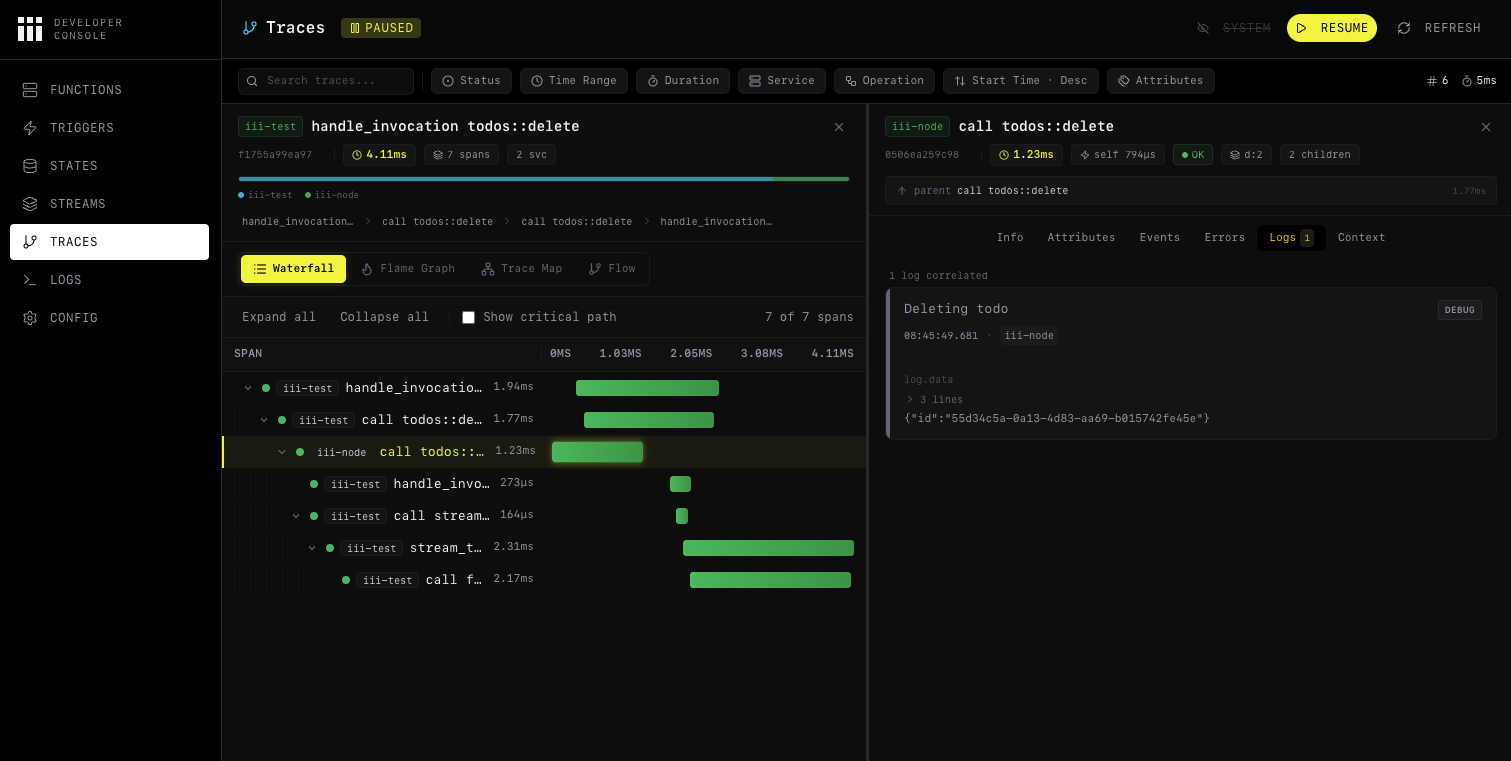
Using the Logger
Import and instantiate
Create a
Logger instance in your function handler. No configuration is required — trace context is injected automatically.- Node / TypeScript
- Python
- Rust
Attach structured data
Pass a second argument with key-value data. Structured data becomes filterable attributes in the iii Console and in any OTLP-compatible backend.
- Node / TypeScript
- Python
- Rust
Prefer key-value objects over string interpolation. Structured fields let you filter, aggregate, and build dashboards — string-interpolated messages do not.
Logger API reference
All three SDKs expose the same four methods:| Method | Node / TypeScript | Python | Rust |
|---|---|---|---|
| Info | logger.info(msg, data?) | logger.info(msg, data=None) | logger.info(msg, Option<Value>) |
| Warning | logger.warn(msg, data?) | logger.warn(msg, data=None) | logger.warn(msg, Option<Value>) |
| Error | logger.error(msg, data?) | logger.error(msg, data=None) | logger.error(msg, Option<Value>) |
| Debug | logger.debug(msg, data?) | logger.debug(msg, data=None) | logger.debug(msg, Option<Value>) |
console.* (Node), Python logging (Python), or tracing::* (Rust) — your logs still appear in stdout.
Configuring observability
The iii engine’s Observability worker (iii-observability) controls how traces, logs, and metrics are collected and exported. There are two main configurations depending on your environment.
Local development
For local development, use thememory exporter. Traces and logs are stored in the engine’s memory and can be inspected through the iii Console. This is the simplest setup and requires no external infrastructure.
iii-config.yaml
| Field | Purpose | Default |
|---|---|---|
exporter | Where to send traces: memory, otlp, or both | otlp |
memory_max_spans | Max spans kept in memory | 1000 |
logs_enabled | Enable structured log storage | true (always initialized) |
logs_max_count | Max log entries kept in memory | 1000 |
logs_console_output | Also print logs to the terminal via tracing | true |
With
exporter: memory, all data lives in the engine process. This is ideal for development — no collector, no database, just start the engine and open the console.Exporting to third-party tools
For production or when you want to send telemetry to an external system (Grafana, Jaeger, Datadog, or any OTLP-compatible collector), use theotlp exporter with an endpoint.
iii-config.yaml
exporter: both:
iii-config.yaml
The
endpoint field can also be set via the OTEL_EXPORTER_OTLP_ENDPOINT environment variable. See the Observability worker reference for the full list of configuration fields and environment variable overrides.Using iii Console
The iii Console is a web UI for inspecting traces, logs, metrics, and more. It comes included with every iii installation — no separate setup required. It connects to a running iii engine and gives you full operational visibility.Launch
Start the console while your engine is running:Inspecting traces
Navigate to the Traces page to see all collected traces. Each trace shows its root operation, duration, service name, span count, and status. Click on a trace to open the detail view with four visualization modes:- Waterfall Chart — timeline showing every span by start time and duration. Best for understanding sequential and parallel flow.
- Flame Graph — stack-based view where wider bars mean longer duration. Best for spotting time-consuming operations.
- Service Breakdown — aggregate stats per service (total spans, average duration, error rate). Best for identifying bottleneck services.
- Trace Map — topology graph showing cross-service communication patterns.
Inspecting logs per trace
Click on any span in the trace view to open the detail drawer. Switch to the Logs tab to see every log entry that was emitted during that span’s execution. Each entry includes the severity level, timestamp, message, and structured attributes.trace_id, you can click it to jump directly to the corresponding trace.
Identifying bottlenecks
Use the waterfall chart to spot long-running spans. Switch to the flame graph to see which operations consume the most time relative to the total trace duration. The service breakdown view aggregates performance stats so you can identify which service needs optimization. For more details on all console features, see the Console reference.Result
Your iii application is now fully observable:- Structured logs are correlated to distributed traces automatically — no manual wiring.
- Local visibility is available through iii Console with the
memoryexporter — no external infrastructure needed. - Third-party export sends traces, logs, and metrics to any OTLP-compatible backend via the
otlporbothexporter. - Bottleneck identification is possible through waterfall, flame graph, and service breakdown views in the console.
Next steps
Console
Full iii Console feature reference
OpenTelemetry Integration
Custom spans, metrics, and telemetry utilities
Observability Worker
Full configuration reference for traces, logs, metrics, alerts, and sampling
Observability Example
End-to-end multi-step workflow with trace correlation